소개
The D-Pad is central to many game experiences, and due to use can begin to fail over time. This guide will instruct the user in the process of replacing the D-Pad for the EasySMX-15.
필요한 것
-
-
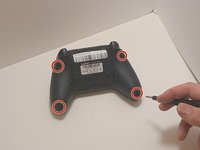
Use a Phillips #00 screwdriver to remove the four 9 mm screws from the bottom of the EasySMX X15.
-
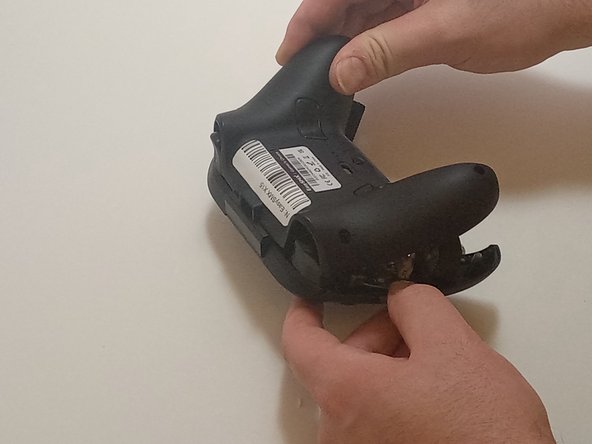
Use an opening tool to gently pry between the seams of the controller to separate the lower and upper casings.
 FixBot에 문의하기
-
-
-
Disconnect the vibration motor cables from the connectors on the circuit board.
-
Use a Phillips #00 screwdriver to remove six, 6mm screws from the board.
-
-
-
-
Gently lift the board away from the upper casing, maneuvering it around the triggers by lifting it from the bottom, away from the upper casing.
-
-
-
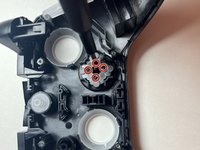
Use the Phillips #00 screwdriver to remove the four 4 mm screws securing the D-pad to the controller casing.
-
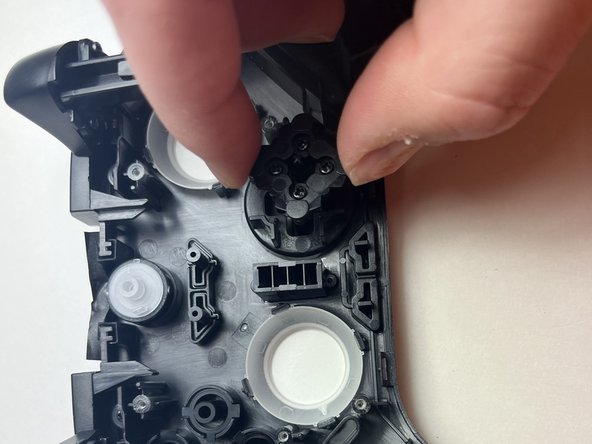
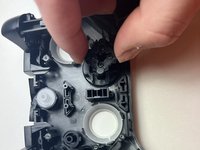
Lift the back of the D-pad, along with the membrane, to remove them from the controller.
-
Lift up the case, allowing the D-pad to detach from the top of the casing.
-



To reassemble your device, follow these instructions in reverse order.

팀

Austin Community College, Team 7-3, Watkins Fall 2024 Austin Community College, Team 7-3, Watkins Fall 2024 회원
AUSTINCC-WATKINS-F24S7G3
3 회원들
안내서 7개를 작성함
