소개
If the tablet has out of focus pictures or doesn't take them at all, this guide will show you how to replace the camera. Tools that are needed will include a Phillips Head screwdriver with a #00 3mm screw, spudger, plastic opening tool, as well as a pair of tweezers to properly remove the broken equipment.
필요한 것
-
-
Use a Phillips 00 bit to remove two 3mm screws from the bottom of the tablet.
 FixBot에 문의하기
-
-
-
Insert the nylon spudger into the bottom of the tablet, and gently slide it up the side.
-
Pull apart the two sides of the tablet, exposing the circuit board, battery, and other components of the tablet.
-
-
-
-
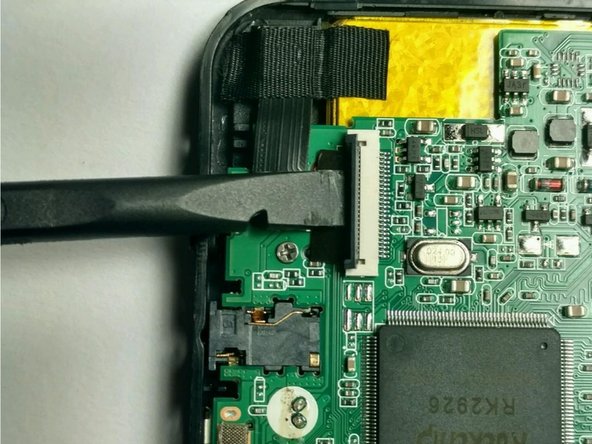
Using the spudger to raise the zero insertion force (ZIF) connector to freely release the ribbon.
-
-
이 단계에 사용된 도구:Tweezers$4.99
-
Using tweezers gently pull the ribbon off of the enclosure.
-
Remove the camera.
-




To reassemble your device, follow these instructions in reverse order.

팀

USF Tampa, Team 2-5, Blackwell Fall 2016 USF Tampa, Team 2-5, Blackwell Fall 2016 회원
USFT-BLACKWELL-F16S2G5
4 회원들
안내서 12개를 작성함
