소개
Follow this JBL Tune 500bt Speakers Removal Guide to open it
필요한 것
-
-
-
-
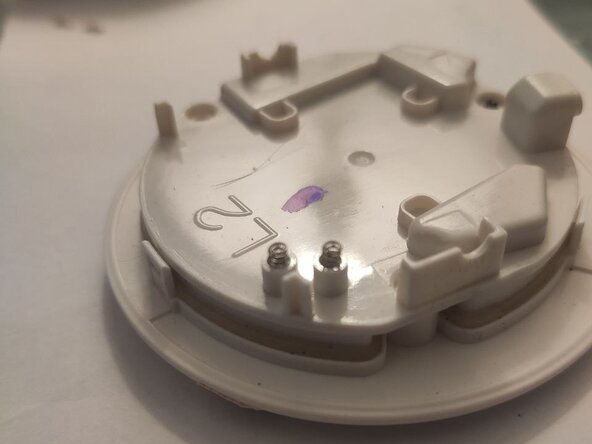
Find two springs and gently pull them about one or two millimetres (approximately 1/32 to 1/16 inches for those using Imperial measurement).
-
-
-
It would be nice, but not necessary, to clean these two connecting pads with isopropyl alcohol for better connectivity.
-
That's it, you're almost done! Now, do the JBL Tune 500bt Speakers Removal Guide backwards to reasssemble and enjoy! (Putting pads back revealed in the Conclusion)
-



 FixBot에 문의하기


Ah, to put these pads back on -- push a layer into a small vertical slit on upper half of driver cover, and carefully twist it, like opening a tincan, but backwards ;))
Replace headphone pads
다른 2명이 해당 안내서를 완성하였습니다.

