주요 콘텐츠로 건너뛰기
수리 커뮤니티 가입 - 계정 만들기

Fujifilm FinePix S4200 Viewfinder Replacement

필요한 것

  1. Fujifilm FinePix S4200 Viewfinder  Replacement, LCD Screen: 1 단계, 이미지 1개 중 1개
    • Turn the camera off.

    • Turn the camera upside down so that the battery compartment is showing.

    댓글 쓰기

  2. Fujifilm FinePix S4200 Viewfinder  Replacement: 2 단계, 이미지 1개 중 1개
    • Remove the three 4 mm screws from the bottom of the camera with a Phillips #000 screwdriver.

    댓글 쓰기

  3. Fujifilm FinePix S4200 Viewfinder  Replacement: 3 단계, 이미지 1개 중 1개
    • Rotate camera to the side where the speaker ports are located.

    • Remove the three 4 mm screws with a Phillips #000 screwdriver.

    댓글 쓰기

  4. Fujifilm FinePix S4200 Viewfinder  Replacement: 4 단계, 이미지 1개 중 1개
    • Turn the camera to the opposite side where the HDMI port is located.

    • Remove all five 4 mm screws with a Phillips #000 screwdriver.

    댓글 쓰기

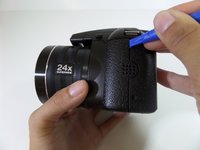
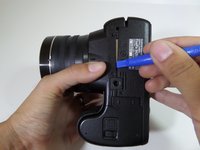
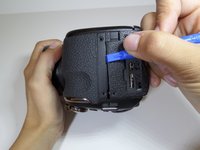
  5. Fujifilm FinePix S4200 Viewfinder  Replacement: 5 단계, 이미지 3개 중 1개 Fujifilm FinePix S4200 Viewfinder  Replacement: 5 단계, 이미지 3개 중 2개 Fujifilm FinePix S4200 Viewfinder  Replacement: 5 단계, 이미지 3개 중 3개
    • Casing is fragile.

    • Utilize the plastic opening tool to pry in between the back casing of the camera from the front casing.

    • Continue this motion around the camera to create a wedge between the front and back casing of the camera.

    댓글 쓰기

  6. Fujifilm FinePix S4200 Viewfinder  Replacement: 6 단계, 이미지 1개 중 1개
    • Use force to pull apart the back casing from the camera.

    댓글 쓰기

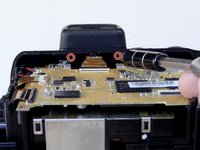
  7. Fujifilm FinePix S4200 Viewfinder  Replacement: 7 단계, 이미지 1개 중 1개
    • Remove the two 4 mm screws that hold the motherboard and metal plate in place.

    댓글 쓰기

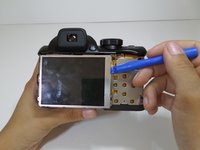
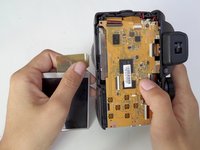
  8. Fujifilm FinePix S4200 Viewfinder  Replacement: 8 단계, 이미지 2개 중 1개 Fujifilm FinePix S4200 Viewfinder  Replacement: 8 단계, 이미지 2개 중 2개
    • Utilize the plastic opening tool to gently lift the LCD screen away from the metal plate.

    • Flip over LCD screen so that the left side of the metal plate is visible.

    댓글 쓰기

  9. Fujifilm FinePix S4200 Viewfinder  Replacement: 9 단계, 이미지 1개 중 1개
    • Rotate the camera vertically so that it is easier to manage.

    • Use a Phillips #000 screwdriver to remove the two 4mm screws that are located on the metal plate under the LCD screen.

    댓글 쓰기

  10. Fujifilm FinePix S4200 Viewfinder  Replacement: 10 단계, 이미지 1개 중 1개
    • Detach the metal plate from the motherboard.

    댓글 쓰기

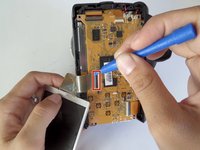
  11. Fujifilm FinePix S4200 Viewfinder  Replacement: 11 단계, 이미지 2개 중 1개 Fujifilm FinePix S4200 Viewfinder  Replacement: 11 단계, 이미지 2개 중 2개
    • The orange ribbon cable is fragile.

    • Pull back the small black latch connecting the orange ribbon cable to the motherboard.

    • Gently remove the LCD screen from the motherboard.

    댓글 쓰기

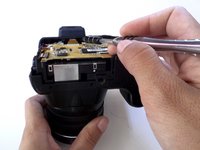
  12. Fujifilm FinePix S4200 Viewfinder  Replacement, Viewfinder: 12 단계, 이미지 2개 중 1개 Fujifilm FinePix S4200 Viewfinder  Replacement, Viewfinder: 12 단계, 이미지 2개 중 2개
    • Remove the two 4 mm screws with a Phillips 000 screwdriver under the viewfinder.

    댓글 쓰기

  13. Fujifilm FinePix S4200 Viewfinder  Replacement: 13 단계, 이미지 1개 중 1개
    • Carefully pull off the plastic cover from the view finder.

    댓글 쓰기

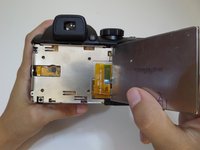
  14. Fujifilm FinePix S4200 Viewfinder  Replacement: 14 단계, 이미지 1개 중 1개
    • Remove the two 3mm screws surrounding the viewfinder with a Phillips 000 screwdriver.

    댓글 쓰기

  15. Fujifilm FinePix S4200 Viewfinder  Replacement: 15 단계, 이미지 1개 중 1개
    • Orange ribbon is fragile.

    • Using the plastic opening tool, pull down the small black latch to remove the orange ribbon from the mother board.

    댓글 쓰기

  16. Fujifilm FinePix S4200 Viewfinder  Replacement: 16 단계, 이미지 1개 중 1개
    • Pull the viewfinder up to remove it from the body of the camera

    댓글 쓰기

결론

To reassemble your device, follow these instructions in reverse order.

취소: 해당 안내서를 완성하지 않았습니다.

다른 2명이 해당 안내서를 완성하였습니다.

작성자

5다른 기여자 명과 함께

Melissa Burciaga

회원 가입일: 09/14/15

158 평판

안내서 1개를 작성함

CSU Fullerton, Team 1-4, Bruce Fall 2015 CSU Fullerton, Team 1-4, Bruce Fall 2015 회원

CSUF-BRUCE-F15S1G4

4 회원들

안내서 7개를 작성함

0가이드 댓글

댓글 쓰기

조회 통계:

지난 24시간: 1

지난 7일: 2

지난 30일: 23

전체 시간: 1,264