소개
The wireless card is a key factor for your everyday laptop use. This wireless card is refereed to as a NIC or Network Interface Card it is square in shape, and is located in the middle section in the back of the laptop where the memory cards and hard drive both are. Also, before attempting to do a replacement, make sure your device is powered off and make sure to read through the guide first before jumping straight into a repair. Safety is always first!
필요한 것
-
-
Using a nylon spudger or your fingers, push down on the orange battery clip to release the battery.
-
-
-
-
Next, using the PH1 head from the tool kit and the adjustable screwdriver, remove the 2 M3x5.0mm screws on the casing to get to the wireless card.
-
-
-
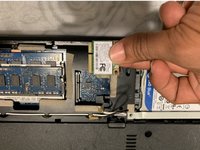
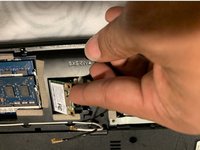
When located, remove the black and white cables from the wireless card. These are main and auxiliary antenna câbles.
-
-
-
Using the PH1 head from the tool kit and the adjustable screwdriver, remove the M3x5.0mm screw with that is keeping the wireless card intact.
-

 FixBot에 문의하기


To reassemble your device, please follow these instructions in reverse order.

팀

UMass Dartmouth, Team S6-G1, Peak Spring 2019 UMass Dartmouth, Team S6-G1, Peak Spring 2019 회원
UMASSD-PEAK-S19S6G1
2 회원들
안내서 8개를 작성함
