주요 콘텐츠로 건너뛰기

Game Boy Micro Battery Replacement

필요한 것

  1. Game Boy Micro Battery Replacement, Remove the Cover: 1 단계, 이미지 2개 중 1개 Game Boy Micro Battery Replacement, Remove the Cover: 1 단계, 이미지 2개 중 2개
    • Remove the Phillips #00 screw on the side of the Game Boy closest to the directional pad.

    • Once the screw has been loosened, lift the cover off the back of the device.

  2. Game Boy Micro Battery Replacement, Remove battery: 2 단계, 이미지 3개 중 1개 Game Boy Micro Battery Replacement, Remove battery: 2 단계, 이미지 3개 중 2개 Game Boy Micro Battery Replacement, Remove battery: 2 단계, 이미지 3개 중 3개
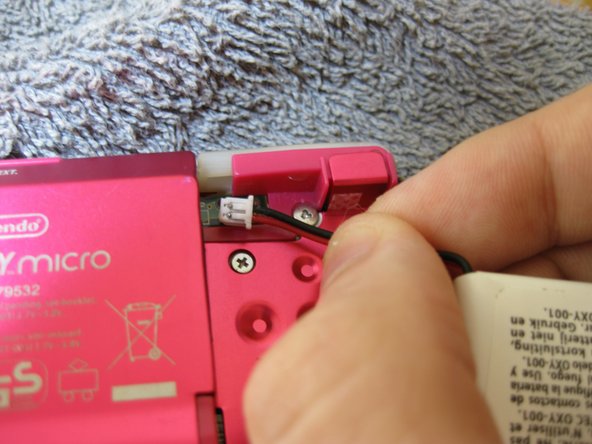
    • Grip, and gently pull outwards on the cable as close to the battery connector as you can

    • Pull in level with the back cover in the direction as indicated by the arrow (not upwards, and not sideways), otherwise you could damage the connector, the cable, or just rip everything off.

    • When plugging the battery back in, make sure to use a non-conductive tool with a flat head to push the battery plug back into the connector, to avoid shorting the battery pins in the plug.

결론

To reassemble your device, follow these instructions in reverse order.

다른 한 분이 해당 안내서를 완성하였습니다.

작성자

2다른 기여자 명과 함께

SonoSooS

회원 가입일: 07/30/24

242 평판

안내서 2개를 작성함

0가이드 댓글

댓글 쓰기

조회 통계:

지난 24시간: 5

지난 7일: 25

지난 30일: 113

전체 시간: 1,711