소개
This guide will walk you through the process of replacing a dead or dying battery in a Gateway LT2514u.
필요한 것
-
-
With the netbook's lid closed, flip it over and slide the latch on the upper left hand side of the netbook to the left.
 FixBot에 문의하기
-
-
-
-
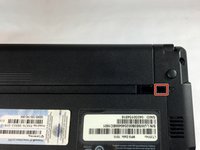
In the upper right-hand corner of the netbook, slide and hold the switch to the right.
-
Use your other hand to slide out the battery.
-
-
이 단계에 사용된 도구:Tweezers$4.99
-
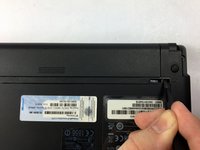
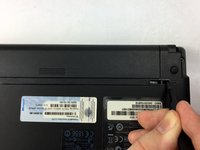
If the release switch in the upper right-hand area is missing, insert a slender tool (we used tweezers) into the left side of the smaller hole.
-
Slide and hold the tweezers to the right and use your other hand to slide the battery out.
-


To reassemble your device, follow these instructions in reverse order.
다른 한 분이 해당 안내서를 완성하였습니다.

팀

USF Tampa, Team 3-2, Sullivan Fall 2016 USF Tampa, Team 3-2, Sullivan Fall 2016 회원
USFT-SULLIVAN-F16S3G2
3 회원들
안내서 12개를 작성함
