주요 콘텐츠로 건너뛰기
수리 커뮤니티 가입 - 계정 만들기

Gateway MS2370 Keyboard Replacement

필요한 것

  1. Gateway MS2370 Keyboard Replacement, Battery: 1 단계, 이미지 1개 중 1개
    • Make sure the laptop is turned off and flipped over so that the bottom is facing up. Then, locate the battery clip as shown.

    댓글 쓰기

  2. Gateway MS2370 Keyboard Replacement: 2 단계, 이미지 1개 중 1개
    • Either using your fingers or a plastic spudger push the battery clip to the left to release battery.

    댓글 쓰기

  3. Gateway MS2370 Keyboard Replacement: 3 단계, 이미지 1개 중 1개
    • Pull the battery from the laptop to remove it.

    댓글 쓰기

  4. Gateway MS2370 Keyboard Replacement, Keyboard: 4 단계, 이미지 1개 중 1개
    • Take the plastic spudger and pull up the tabs on all four sides of the keyboard molding.

    댓글 쓰기

  5. Gateway MS2370 Keyboard Replacement: 5 단계, 이미지 1개 중 1개
    • Carefully lift the keyboard molding out.

    댓글 쓰기

  6. Gateway MS2370 Keyboard Replacement: 6 단계, 이미지 1개 중 1개
    • Use the plastic spudger again to pry the keyboard tabs from the laptop.

    댓글 쓰기

  7. Gateway MS2370 Keyboard Replacement: 7 단계, 이미지 1개 중 1개
    • Slowly lift the keyboard from the laptop.

    댓글 쓰기

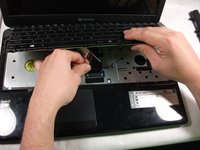
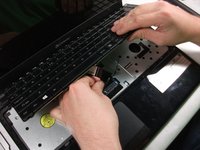
  8. Gateway MS2370 Keyboard Replacement: 8 단계, 이미지 2개 중 1개 Gateway MS2370 Keyboard Replacement: 8 단계, 이미지 2개 중 2개
    • Carefully unplug the ribbon cable attached to the motherboard.

    • The ribbon cable is extremely delicate, handle with care

    댓글 쓰기

  9. Gateway MS2370 Keyboard Replacement: 9 단계, 이미지 1개 중 1개
    • Lift and remove the keyboard from the computer.

    댓글 쓰기

결론

To reassemble your device, follow these instructions in reverse order.

취소: 해당 안내서를 완성하지 않았습니다.

다른 한 분이 해당 안내서를 완성하였습니다.

작성자

2다른 기여자 명과 함께

Mathieu Bolduc-Clayton

회원 가입일: 10/17/17

518 평판

안내서 4개를 작성함

UMass Dartmouth, Team S1-G5, Simcock Fall 2017 UMass Dartmouth, Team S1-G5, Simcock Fall 2017 회원

UMASSD-SIMCOCK-F17S1G5

3 회원들

안내서 10개를 작성함

0가이드 댓글

댓글 쓰기

조회 통계:

지난 24시간: 2

지난 7일: 6

지난 30일: 25

전체 시간: 1,200