주요 콘텐츠로 건너뛰기
수리 커뮤니티 가입 - 계정 만들기

Gateway NV59C66u RAM Replacement

필요한 것

  1. Gateway NV59C66u RAM Replacement, RAM: 1 단계, 이미지 1개 중 1개
    • Remove the four Phillips #0 screws from the back cover.

    댓글 쓰기

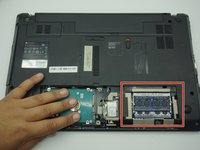
  2. Gateway NV59C66u RAM Replacement: 2 단계, 이미지 1개 중 1개
    • Gently remove the cover with a plastic opening tool to gain access to the RAM.

    댓글 쓰기

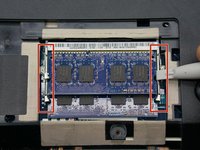
  3. Gateway NV59C66u RAM Replacement: 3 단계, 이미지 2개 중 1개 Gateway NV59C66u RAM Replacement: 3 단계, 이미지 2개 중 2개
    • Free the RAM by unlatching the holders. The two arms on either side of the RAM card should be pried away from one another.

    • The RAM will then pop up to rest at an angle to the laptop.

    댓글 쓰기

  4. Gateway NV59C66u RAM Replacement: 4 단계, 이미지 1개 중 1개
    • Slide the RAM out from the port.

    댓글 쓰기

    • Follow the previous steps in reverse to replace the RAM card.

    댓글 쓰기

결론

To reassemble your device, follow these instructions in reverse order.

취소: 해당 안내서를 완성하지 않았습니다.

작성자

3다른 기여자 명과 함께

Jackson Gandee

회원 가입일: 10/30/19

521 평판

안내서 4개를 작성함

ETECH Holdings ETECH Holdings 회원

Community

2 회원들

안내서 8개를 작성함

0가이드 댓글

댓글 쓰기

조회 통계:

지난 24시간: 1

지난 7일: 5

지난 30일: 27

전체 시간: 403