주요 콘텐츠로 건너뛰기
수리 커뮤니티 가입 - 계정 만들기

GoPro Hero Micro USB/MicroSD Card Daughter BoardReplacement

필요한 것

  1. GoPro Hero Micro USB/MicroSD Card Daughter BoardReplacement, Casing: 1 단계, 이미지 1개 중 1개
    • Power off your GoPro before beginning disassembly.

    • Unclip the black latch to the camera case and open the case.

    댓글 쓰기

  2. GoPro Hero Micro USB/MicroSD Card Daughter BoardReplacement: 2 단계, 이미지 1개 중 1개
    • Gently pry the back open by inserting a metal spudger between the case and back panel.

    댓글 쓰기

  3. GoPro Hero Micro USB/MicroSD Card Daughter BoardReplacement: 3 단계, 이미지 1개 중 1개
    • Disconnect the battery from the motherboard by unplugging the red, white, and black wires from the white adapter.

    댓글 쓰기

  4. GoPro Hero Micro USB/MicroSD Card Daughter BoardReplacement: 4 단계, 이미지 1개 중 1개
    • Disconnect the ribbon cable from the lens by lifting the black latch and gently pulling the ribbon cable from the socket.

    댓글 쓰기

  5. GoPro Hero Micro USB/MicroSD Card Daughter BoardReplacement: 5 단계, 이미지 1개 중 1개
    • Use a Phillips screwdriver (PH000) to remove the four screws around the white plastic piece.

    • Make sure to keep track of these screws as they are very small.

    댓글 쓰기

  6. GoPro Hero Micro USB/MicroSD Card Daughter BoardReplacement: 6 단계, 이미지 1개 중 1개
    • Carefully remove the motherboard and white plastic piece from the case.

    댓글 쓰기

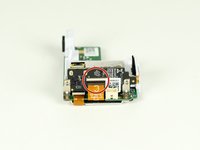
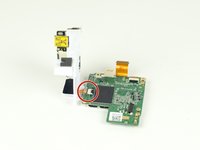
  7. GoPro Hero Micro USB/MicroSD Card Daughter BoardReplacement, Micro USB/MicroSD Card Daughter Board: 7 단계, 이미지 2개 중 1개 GoPro Hero Micro USB/MicroSD Card Daughter BoardReplacement, Micro USB/MicroSD Card Daughter Board: 7 단계, 이미지 2개 중 2개
    • Remove the larger ribbon cable from the daughter board by lifting the black latch and pulling the ribbon cable gently from the socket.

    • Disconnect the smaller ribbon cable leading from the white plastic piece by simply pulling it from the socket.

    댓글 쓰기

  8. GoPro Hero Micro USB/MicroSD Card Daughter BoardReplacement: 8 단계, 이미지 1개 중 1개
    • Remove the two screws located on each side of the board with a Phillips screwdriver.

    • The screws go through an L metal bracket that will come off with the screws.

    댓글 쓰기

  9. GoPro Hero Micro USB/MicroSD Card Daughter BoardReplacement: 9 단계, 이미지 1개 중 1개
    • Separate the daughter board from the white plastic piece.

    댓글 쓰기

결론

To reassemble your device, follow these instructions in reverse order.

취소: 해당 안내서를 완성하지 않았습니다.

다른 5명이 해당 안내서를 완성하였습니다.

작성자

3다른 기여자 명과 함께

River Drake

회원 가입일: 04/02/15

1,065 평판

안내서 5개를 작성함

Cal Poly, Team 12-2, Lancaster Spring 2015 Cal Poly, Team 12-2, Lancaster Spring 2015 회원

CPSU-LANCASTER-S15S12G2

4 회원들

안내서 18개를 작성함

4가이드 댓글

Wo kann ich ein daughterboard kaufen habt ihr da was für mich?

Lukas Blohm - 답글 공유

bravo! è scritto molto bene ed è stato utile. ma dove trovo il ricambio? non ci riesco!!!

michele - 답글 공유

Terrific guide. Does anyone know where to buy the “daughter board”?

fedebossert - 답글 공유

ide. Does anyone know where to buy the “daughter board”?

fedebossert - 05/27/20

<a href="https://www.w3schools.com/">Visit W3Schools.com!</a>

pavan kalyan - 답글 공유

댓글 쓰기

조회 통계:

지난 24시간: 3

지난 7일: 28

지난 30일: 80

전체 시간: 5,554