소개
This guide is helpful if you need to replace a dead or damaged battery. Be careful when removing the battery to not bend or puncture it because it may contain hazardous chemicals.
필요한 것
-
-
Using a Torx T4 screwdriver, remove the four 5 mm screws on the back panel.
 FixBot에 문의하기
-
-
-
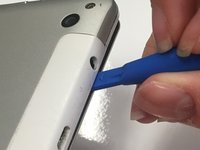
Insert the tip of a plastic opening tool in the seam between the front and back panels.
-
-
-
-
Slide the plastic opening tool around all edges of the device until the back panel detaches.
-
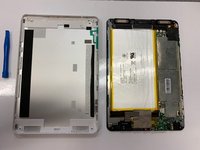
Lift off the back panel.
-
-
-
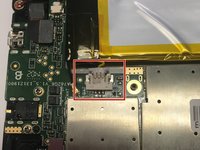
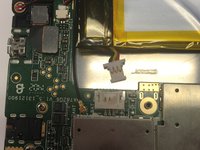
Using a spudger or your fingers, disconnect the power cable by sliding the connector out of the socket on the motherboard.
-
-
이 단계에 사용된 도구:Plastic Cards$2.99
-
Using a plastic card or a nylon spudger, carefully pry the battery from the adhesive on the tablet.
-






To reassemble your device, follow these instructions in reverse order.

팀

University of Alabama, Team S1-G1, Bedsole Spring 2019 University of Alabama, Team S1-G1, Bedsole Spring 2019 회원
UA-BEDSOLE-S19S1G1
4 회원들
안내서 6개를 작성함
