주요 콘텐츠로 건너뛰기
수리 커뮤니티 가입 - 계정 만들기

HP Chromebook 11 G4 Keyboard Replacement

필요한 것

  1. HP Chromebook 11 G4 Keyboard Replacement, Keyboard: 1 단계, 이미지 1개 중 1개
    • Position the closed Chromebook with the rubber pads are facing up.

    댓글 쓰기

  2. HP Chromebook 11 G4 Keyboard Replacement: 2 단계, 이미지 2개 중 1개 HP Chromebook 11 G4 Keyboard Replacement: 2 단계, 이미지 2개 중 2개
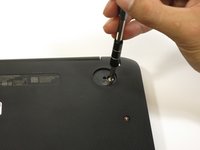
    • Slide the flat end of the spudger under the rubber pads at the upper right-hand and the upper left-hand corners.

    • Pry off the rubber pads to reveal a screw under each pad.

    • The rubber pads are attached with a strong adhesive. The force applied may damage the pads.

    댓글 쓰기

  3. HP Chromebook 11 G4 Keyboard Replacement: 3 단계, 이미지 2개 중 1개 HP Chromebook 11 G4 Keyboard Replacement: 3 단계, 이미지 2개 중 2개
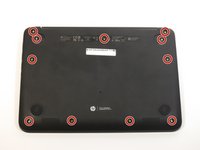
    • Remove the eleven 6mm Phillips #1 screws.

    댓글 쓰기

  4. HP Chromebook 11 G4 Keyboard Replacement: 4 단계, 이미지 1개 중 1개
    • Flip over the Chromebook and open it.

    댓글 쓰기

  5. HP Chromebook 11 G4 Keyboard Replacement: 5 단계, 이미지 2개 중 1개 HP Chromebook 11 G4 Keyboard Replacement: 5 단계, 이미지 2개 중 2개
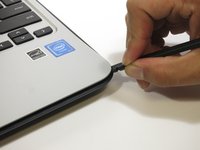
    • Insert the flat end of the spudger between the bottom body of the Chromebook and keyboard body.

    • Slide the spudger along the gap, applying downward pressure to separate the two components.

    • You should hear popping sounds as you slide the spudger along the edge.

    • If the spudger gets stuck while sliding, simply slide the spudger back for a bit, and continue sliding forward.

    댓글 쓰기

  6. HP Chromebook 11 G4 Keyboard Replacement: 6 단계, 이미지 1개 중 1개
    • Lift the bottom of the keyboard assembly to reveal the internal components of the device.

    댓글 쓰기

  7. HP Chromebook 11 G4 Keyboard Replacement: 7 단계, 이미지 3개 중 1개 HP Chromebook 11 G4 Keyboard Replacement: 7 단계, 이미지 3개 중 2개 HP Chromebook 11 G4 Keyboard Replacement: 7 단계, 이미지 3개 중 3개
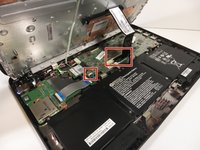
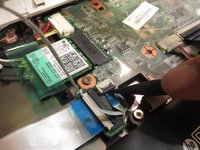
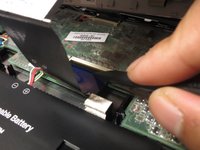
    • Use the pointed end of the spudger to flip up the black tabs on the two ZIF connectors located on the motherboard.

    • Disconnect the ribbon cables from the motherboard by gently sliding them out of their sockets.

    댓글 쓰기

  8. HP Chromebook 11 G4 Keyboard Replacement: 8 단계, 이미지 1개 중 1개
    • Remove the keyboard assembly by lifting it off the laptop base.

    댓글 쓰기

결론

To reassemble your device, follow these instructions in reverse order.

취소: 해당 안내서를 완성하지 않았습니다.

다른 3명이 해당 안내서를 완성하였습니다.

작성자

5다른 기여자 명과 함께

Jair Herrera

회원 가입일: 04/26/17

694 평판

안내서 4개를 작성함

3가이드 댓글

How do you remove the keyboard from the assembly though? And I wish there was a mention of the fact that the heat sink is attached to the keyboard assembly.

Kyle B - 답글 공유

Same question as the person above. I need to remove the keyboard from the assembly.

Stephen Mason - 답글 공유

If you look up the parts you'll see that the entire top panel and keyboard are one assembly.

Nacho Biniz - 답글 공유

댓글 쓰기

조회 통계:

지난 24시간: 1

지난 7일: 18

지난 30일: 61

전체 시간: 10,100