소개
In this guide, we will illustrate how to remove and possibly replace the keyboard of this device. The only tools required are thumbs and a Phillips screwdriver.
필요한 것
-
-
Loosen the three 1.5 cm Phillips #1 screws for the keyboard on the back of the laptop.
 FixBot에 문의하기
-
-
-
-
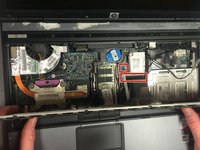
Lift up the keyboard.
-
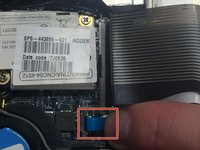
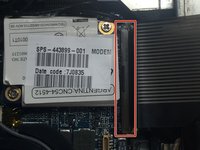
Release both cables that attach the keyboard to the laptop by lifting up the indicated release latches.
-


To reassemble your device, follow these instructions in reverse order.
다른 5명이 해당 안내서를 완성하였습니다.

팀

Montana Tech, Team 3-2, Shirk Fall 2015 Montana Tech, Team 3-2, Shirk Fall 2015 회원
MTUM-SHIRK-F15S3G2
5 회원들
안내서 5개를 작성함
