주요 콘텐츠로 건너뛰기
수리 커뮤니티 가입 - 계정 만들기

HP Compaq nc8430 Spacebar Replacement

필요한 것

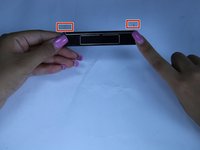
  1. HP Compaq nc8430 Spacebar Replacement, Spacebar: 1 단계, 이미지 1개 중 1개
    • slide the latch to the right

    • slowly raise screen up

  2. HP Compaq nc8430 Spacebar Replacement: 2 단계, 이미지 3개 중 1개 HP Compaq nc8430 Spacebar Replacement: 2 단계, 이미지 3개 중 2개 HP Compaq nc8430 Spacebar Replacement: 2 단계, 이미지 3개 중 3개
    • Place a plastic opening tool, under the edge of the space bar and gently pry up to release the spacebar.

  3. HP Compaq nc8430 Spacebar Replacement: 3 단계, 이미지 2개 중 1개 HP Compaq nc8430 Spacebar Replacement: 3 단계, 이미지 2개 중 2개
    • observe the long metal rod attached to the bottom of the space bar

    • unhook the ends of the metal rod from the keyboard, completely removing the space bar key

    • if you notice any dust, dip a cotton swab in alcohol and clean the area under the space bar

결론

To reassemble your device, follow these instructions in reverse order.

다른 한 분이 해당 안내서를 완성하였습니다.

작성자

2다른 기여자 명과 함께

Andres Castro

회원 가입일: 03/20/17

160 평판

안내서 1개를 작성함

Texas Tech, Team S13-G4, Bennett Spring 2017 Texas Tech, Team S13-G4, Bennett Spring 2017 회원

TTU-BENNETT-S17S13G4

5 회원들

안내서 5개를 작성함

0가이드 댓글

댓글 쓰기

조회 통계:

지난 24시간: 0

지난 7일: 3

지난 30일: 9

전체 시간: 541