소개
The computers hard drive is where all of its data is stored and kept when the computer is turned off. Upgrading it to a larger or faster HDD or SSD is very important in keeping your computer running properly. This simple guide shows how to easily access the HDD bay within the laptop.
필요한 것
-
-
-
Place the laptop face down in front of you.
-
Use a Phillips #0 screwdriver to remove the three 3 mm screws from the back of the case.
-
Remove the back panel.
 FixBot에 문의하기
-
-
-
-
Use a Phillips #0 screwdriver to remove the two 3 mm screws from the small metal HDD bracket.
-
Lift up on the small bracket and pull it off.
-
-
-
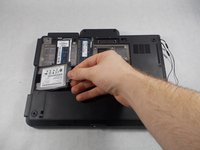
Pull out the hard drive and the small rubber sleigh that holds it.
-
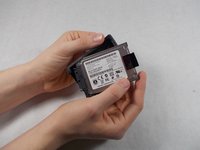
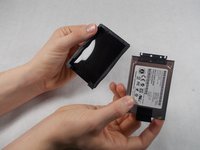
Pull the rubber sleigh off of the hard drive.
-
-


To reassemble your device, follow these instructions in reverse order.
다른 6명이 해당 안내서를 완성하였습니다.

팀

UMass Dartmouth, Team S8-G4, Valliere Spring 2018 UMass Dartmouth, Team S8-G4, Valliere Spring 2018 회원
UMASSD-VALLIERE-S18S8G4
3 회원들
안내서 17개를 작성함
1가이드 댓글
You can use any mSATA SSD as replacement by using the following caddy/adapter:
https://www.ebay.fr/itm/165266235415
jacques_06
jacques_06 - 답글 공유
