주요 콘텐츠로 건너뛰기

HP G62-223CL RAM Replacement

필요한 것

  1. HP G62-223CL RAM Replacement, Battery Removal: 1 단계, 이미지 2개 중 1개 HP G62-223CL RAM Replacement, Battery Removal: 1 단계, 이미지 2개 중 2개
    • Removing the battery while the laptop is still on may corrupt your files.

    • Turn the device over to expose the bottom of the device.

    • Slide the battery release all the way to the left.

    • There will be a click and the battery will be released from its compartment.

  2. HP G62-223CL RAM Replacement: 2 단계, 이미지 1개 중 1개
    • Carefully remove the battery from its compartment.

  3. HP G62-223CL RAM Replacement, RAM: 3 단계, 이미지 1개 중 1개
    • Locate three Phillips head retaining screws which secure RAM compartment.

    • Use a Phillips #0 screwdriver to loosen the screws.

    • Remove the panel covering the compartment.

    • Ground yourself before attempting to touch any components. To ground yourself, touch a conductive metal to eliminate any static buildup in your body, which can damage computer components.

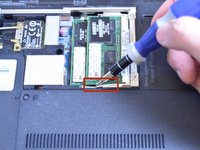
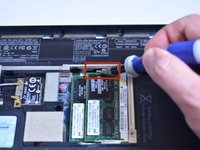
  4. HP G62-223CL RAM Replacement: 4 단계, 이미지 2개 중 1개 HP G62-223CL RAM Replacement: 4 단계, 이미지 2개 중 2개
    • Use the tip of a screw driver to press the release clips away from the RAM module.

    • Once the second clip is released, the module will automatically pop up.

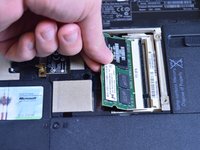
  5. HP G62-223CL RAM Replacement: 5 단계, 이미지 1개 중 1개
    • Carefully remove module from slot.

    • Be careful not to damage modules when removing them from their slots.

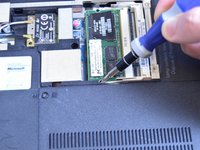
  6. HP G62-223CL RAM Replacement: 6 단계, 이미지 2개 중 1개 HP G62-223CL RAM Replacement: 6 단계, 이미지 2개 중 2개
    • Repeat steps 4 and 5 for additional RAM modules.

결론

To reassemble your device, follow these instructions in reverse order.

다른 한 분이 해당 안내서를 완성하였습니다.

작성자

4다른 기여자 명과 함께

Garret Layton

회원 가입일: 01/13/15

669 평판

안내서 5개를 작성함

USF Tampa, Team 1-4, Sullivan Winter 2015 USF Tampa, Team 1-4, Sullivan Winter 2015 회원

USFT-SULLIVAN-W15S1G4

4 회원들

안내서 5개를 작성함

0가이드 댓글

댓글 쓰기

조회 통계:

지난 24시간: 0

지난 7일: 1

지난 30일: 5

전체 시간: 759