주요 콘텐츠로 건너뛰기
수리 커뮤니티 가입 - 계정 만들기

HP Pavilion N3350 Fan Replacement

필요한 것

  1. HP Pavilion N3350 Fan Replacement, Fan: 1 단계, 이미지 1개 중 1개
    • Locate the fan on the underside of the laptop.

  2. HP Pavilion N3350 Fan Replacement: 2 단계, 이미지 1개 중 1개
    • Using a Phillips #1 screwdriver, remove the 4.5 mm screw securing the fan cover to the device.

  3. HP Pavilion N3350 Fan Replacement: 3 단계, 이미지 1개 중 1개
    • Use a plastic spudger tool to free the cover.

    • The fan cover is extremely fragile and easy to break. Use caution during this step.

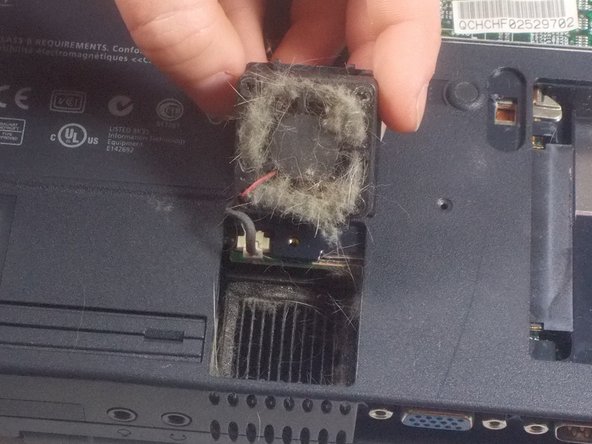
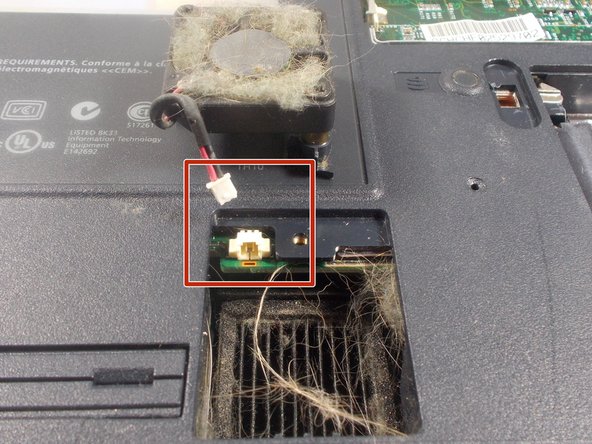
  4. HP Pavilion N3350 Fan Replacement: 4 단계, 이미지 3개 중 1개 HP Pavilion N3350 Fan Replacement: 4 단계, 이미지 3개 중 2개 HP Pavilion N3350 Fan Replacement: 4 단계, 이미지 3개 중 3개
    이 단계에 사용된 도구:
    Tweezers
    $4.99
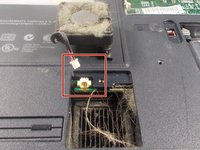
    • Lift the fan up from the device.

    • If you're cleaning the fan, stop at this step, and remove any build up. This can be done with tweezers and canned air.

    • Disconnect the fan cable to fully remove the fan from the device.

결론

To reassemble your device, follow these instructions in reverse order.

다른 한 분이 해당 안내서를 완성하였습니다.

작성자

2다른 기여자 명과 함께

Emily Hatstat

회원 가입일: 03/19/18

481 평판

안내서 4개를 작성함

UMass Dartmouth, Team S3-G8, Peak Spring 2018 UMass Dartmouth, Team S3-G8, Peak Spring 2018 회원

UMASSD-PEAK-S18S3G8

3 회원들

안내서 8개를 작성함

0가이드 댓글

댓글 쓰기

조회 통계:

지난 24시간: 0

지난 7일: 13

지난 30일: 51

전체 시간: 318