주요 콘텐츠로 건너뛰기
수리 커뮤니티 가입 - 계정 만들기

HP Pavilion zv5000 Keyboard Replacement

필요한 것

  1. HP Pavilion zv5000 Keyboard Replacement, Battery: 1 단계, 이미지 1개 중 1개
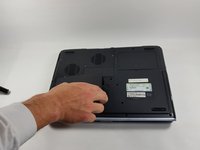
    • Make sure that your device is properly shut down and unplugged from any outlet.

    • Flip Pavilion over so that the bottom faces up and locate the battery in the bottom left corner.

  2. HP Pavilion zv5000 Keyboard Replacement: 2 단계, 이미지 2개 중 1개 HP Pavilion zv5000 Keyboard Replacement: 2 단계, 이미지 2개 중 2개
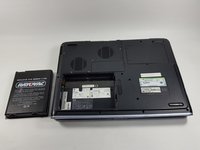
    • Press and slide up the battery release tab with your thumb until the battery pops out of place.

  3. HP Pavilion zv5000 Keyboard Replacement: 3 단계, 이미지 2개 중 1개 HP Pavilion zv5000 Keyboard Replacement: 3 단계, 이미지 2개 중 2개
    • Using two fingers, pry the rest of the battery out of the socket.

  4. HP Pavilion zv5000 Keyboard Replacement, Keyboard: 4 단계, 이미지 2개 중 1개 HP Pavilion zv5000 Keyboard Replacement, Keyboard: 4 단계, 이미지 2개 중 2개
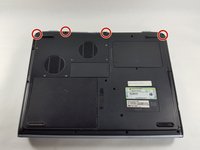
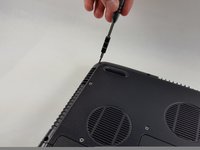
    • Using a Phillips #0 screwdriver, unscrew all four Phillips PM 2.5X13.0mm screws and place in a secure area until the end of the project.

  5. HP Pavilion zv5000 Keyboard Replacement: 5 단계, 이미지 1개 중 1개
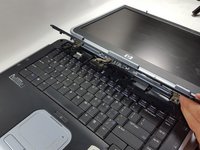
    • Flip laptop back over and open as far as it can go.

  6. HP Pavilion zv5000 Keyboard Replacement: 6 단계, 이미지 1개 중 1개
    • Use the flat edge of the plastic spudger inserted under the bottom of the strip cover and pry upwards to un-clip the cover, starting at the right and moving to the left.

    • If the plastic spudger is not doing the trick, try using the metal spudger careful to not pop any keys out.

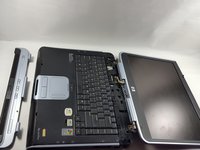
  7. HP Pavilion zv5000 Keyboard Replacement: 7 단계, 이미지 2개 중 1개 HP Pavilion zv5000 Keyboard Replacement: 7 단계, 이미지 2개 중 2개
    • Use hands to completely lift off the strip cover and remove.

  8. HP Pavilion zv5000 Keyboard Replacement: 8 단계, 이미지 1개 중 1개
    • Use the Phillips #0 screwdriver again, unscrew all four Phillips PM 2.5X13.0mm screws from the top of the keyboard and set aside.

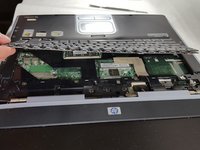
  9. HP Pavilion zv5000 Keyboard Replacement: 9 단계, 이미지 2개 중 1개 HP Pavilion zv5000 Keyboard Replacement: 9 단계, 이미지 2개 중 2개
    • Using your hands, lift the keyboard up from the top towards yourself until the keyboard is resting in your hand.

    • Do not aggressively pull at the keyboard for risk of ripping the connector cable.

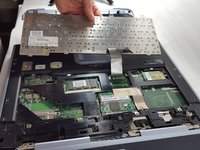
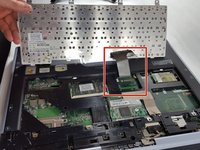
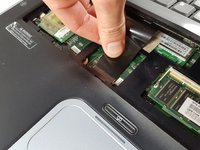
  10. HP Pavilion zv5000 Keyboard Replacement: 10 단계, 이미지 2개 중 1개 HP Pavilion zv5000 Keyboard Replacement: 10 단계, 이미지 2개 중 2개
    • Gently slide out the connecting cable from the laptop to the keyboard.

    • Do not aggressively pull at the connecting cable.

  11. HP Pavilion zv5000 Keyboard Replacement: 11 단계, 이미지 1개 중 1개
    • Completely remove the keyboard from the rest of the laptop.

결론

To reassemble your device, follow these instructions in reverse order.

작성자

3다른 기여자 명과 함께

Eliza Marks

회원 가입일: 10/18/16

649 평판

안내서 5개를 작성함

UMass Dartmouth, Team 4-6, Catania Fall 2016 UMass Dartmouth, Team 4-6, Catania Fall 2016 회원

UMASSD-CATANIA-F16S4G6

3 회원들

안내서 5개를 작성함

0가이드 댓글

댓글 쓰기

조회 통계:

지난 24시간: 0

지난 7일: 2

지난 30일: 19

전체 시간: 1,121