소개
This guide will walk you through the process of replacing a faulty or damaged screen in an HP Stream 11 laptop. This should take you about 10-15 minutes. There are hidden screws under plastic covers that inhibit your ability to remove the screen and could damage your screen. Once these screws are removed it is fairly simple to remove your screen.
필요한 것
-
-
-
Pry off the two elliptical rubber inserts (one in each corner).
-
Pry off the two circular rubber inserts below the removed elliptical inserts (one in each corner).
 FixBot에 문의하기
-
-
-
Turn the computer upright and lift the screen.
-
Carefully use a spudger to pry the plastic keyboard cover from the base.
-
Work the spudger around the cover to release the clips attaching the cover to the base.
-
-
-
-
Disconnect the cable connecting the ClickPad to the base.
-
Remove the plastic keyboard cover.
-
-
-
-
-
Tilt the top of the keyboard plate up until you separate it from the base.
-
Tilt the keyboard toward you slowly but do not remove it, it is still connected with ribbon cables.
-
-
-
Lift up the retaining flaps on the ZIF connectors securing the two keyboard ribbon cables.
-
After disengaging the connectors, gently unplug both ribbon cables.
-
-
-
-
-
Lift the black flap on the display cable ZIF connector.
-
After lifting the flap, gently pull the display cable from its socket.
-
Disconnect the wireless antenna from the wireless card.
-
Remove the four 2.2 mm Phillips #00 screws on the left and right sides of the laptop.
-
-
이 단계에 사용된 도구:Tweezers$4.99
-
Use tweezers to remove the screw covers from the lid.
-
Remove the two 2.2 mm Phillips #000 screws.
-
Use a plastic opening tool to disengage the front part of the lid.
-
-
-
-
-
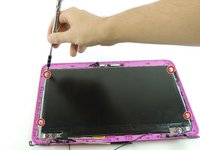
Unscrew the four 3.3mm Phillips #000 screws as indicated.
-
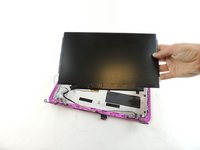
Lift the screen from the lid carefully.
-
-


To reassemble your device, follow these instructions in reverse order.
다른 11명이 해당 안내서를 완성하였습니다.

팀

USF Tampa, Team 3-5, Wollert Spring 2016 USF Tampa, Team 3-5, Wollert Spring 2016 회원
USFT-WOLLERT-S16S3G5
5 회원들
안내서 45개를 작성함
