주요 콘텐츠로 건너뛰기
수리 커뮤니티 가입 - 계정 만들기

HP ZBook 15 Hard Drive Disassembly

단지 전제 조건
이 가이드는 전제 조건만을 다룹니다! 이 가이드는 다른 절차의 일부이며 단독으로 사용할 수 없습니다.

필요한 것

  1. HP ZBook 15 Hard Drive Disassembly, Battery: 1 단계, 이미지 2개 중 1개 HP ZBook 15 Hard Drive Disassembly, Battery: 1 단계, 이미지 2개 중 2개
    • Flip the laptop over.

    • Slide the lever with the battery symbol beside it firmly until the battery pops out.

    • Remove the battery from the laptop.

  2. HP ZBook 15 Hard Drive Disassembly, Back Cover: 2 단계, 이미지 1개 중 1개
    • Slide the right lever firmly to the right.

    • Slide the cover towards yourself to remove it.

  3. HP ZBook 15 Hard Drive Disassembly, HP ZBook 15 Hard Drive Disassembly: 3 단계, 이미지 1개 중 1개
    • Unscrew the three captive screws holding the drive in place with a Phillips #0 screwdriver.

    • The screws will remain inside the springs of the hard drive caddy cover.

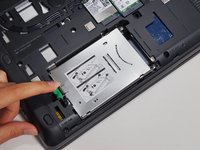
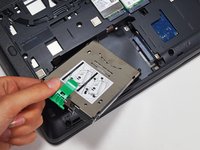
  4. HP ZBook 15 Hard Drive Disassembly: 4 단계, 이미지 2개 중 1개 HP ZBook 15 Hard Drive Disassembly: 4 단계, 이미지 2개 중 2개
    • Pull the green tab away from the metal casing and lift the drive out.

결론

To reassemble your device, follow these instructions in reverse order.

작성자

6다른 기여자 명과 함께

Grant Terris

회원 가입일: 01/30/15

2,882 평판

안내서 12개를 작성함

Cal Poly, Team 8-43, Amido Winter 2015 Cal Poly, Team 8-43, Amido Winter 2015 회원

CPSU-AMIDO-W15S8G43

4 회원들

안내서 19개를 작성함

0가이드 댓글

댓글 쓰기

조회 통계:

지난 24시간: 1

지난 7일: 5

지난 30일: 16

전체 시간: 385