주요 콘텐츠로 건너뛰기
수리 커뮤니티 가입 - 계정 만들기

Hisense Sero 7 Pro GPS Antenna Replacement

필요한 것

  1. Hisense Sero 7 Pro  GPS Antenna Replacement, GPS Antenna: 1 단계, 이미지 2개 중 1개 Hisense Sero 7 Pro  GPS Antenna Replacement, GPS Antenna: 1 단계, 이미지 2개 중 2개
    • Turn tablet off before disassembling it.

    • Use caution when handling device if screen is cracked.

    • Using a plastic opening tool, pry open the back cover from the tablet.

    • An extra set of hands may be required.

  2. Hisense Sero 7 Pro  GPS Antenna Replacement: 2 단계, 이미지 2개 중 1개 Hisense Sero 7 Pro  GPS Antenna Replacement: 2 단계, 이미지 2개 중 2개
    • Pull the Wi-Fi antenna directly upwards to remove it from the motherboard.

    • Be gentle when disconnecting the antenna because it may damage the part it is attached to.

  3. Hisense Sero 7 Pro  GPS Antenna Replacement: 3 단계, 이미지 2개 중 1개 Hisense Sero 7 Pro  GPS Antenna Replacement: 3 단계, 이미지 2개 중 2개
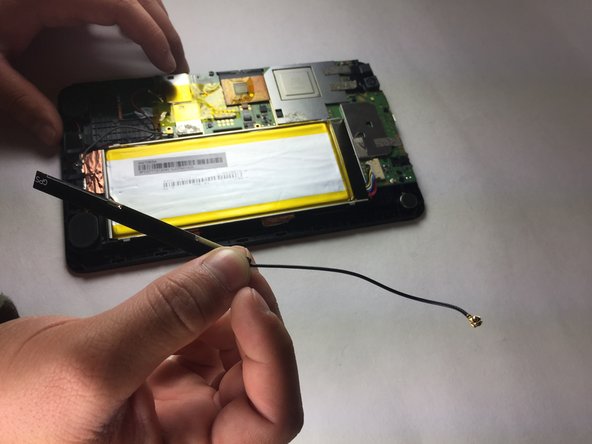
    • Insert a metal or nylon spudger on the edge of the GPS satellite and begin separating it from the adhesive.

    • Slowly peel the GPS from left to right as the GPS is clammy.

결론

To reassemble your device, follow these instructions in reverse order.

작성자

3다른 기여자 명과 함께

Baochau Nguyen

회원 가입일: 10/11/16

314 평판

안내서 3개를 작성함

Texas Tech, Team 38-2, Bennett Fall 2016 Texas Tech, Team 38-2, Bennett Fall 2016 회원

TTU-BENNETT-F16S38G2

4 회원들

안내서 6개를 작성함

0가이드 댓글

댓글 쓰기

조회 통계:

지난 24시간: 1

지난 7일: 5

지난 30일: 19

전체 시간: 431