소개
The air filter may need to be replaced more frequently than other parts of this device for its most optimal performance. You may notice this part needs replacing if the device begins to make a humming noise in excess or the device becomes hot when in use and may even shut itself off due to overheating.
필요한 것
-
-
-
Begin with turning the projector on its side so the bottom of the device is clearly visible.
 FixBot에 문의하기
-
-
-
-
In the bottom left hand corner of the device there will be a vent.
-
At the bottom of the vent, there will be two pull tabs. Remove the vent by gently pushing up on the tabs.
-
Once the tabs are pushed, the vent will pop out and will be able to easily be taken off the device.
-
-
-
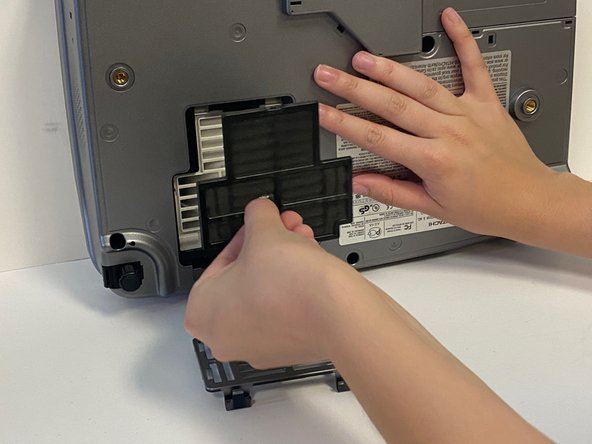
Once the vent is removed, you will see the black air filter.
-
To remove the air filter, gently grab the center handle and pull.
-
The air filter can be discarded into a waste basket.
-
-


To reassemble your device, follow these instructions in reverse order.
다른 한 분이 해당 안내서를 완성하였습니다.

팀

University of Alabama, Team 2-2, Bedsole Spring 2022 University of Alabama, Team 2-2, Bedsole Spring 2022 회원
UA-BEDSOLE-S22S2G2
4 회원들
안내서 12개를 작성함
