소개
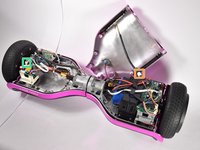
If you need to access the internals of your Hover-1, or want to replace the case, use this guide. It will show you how to remove the case. You will need a Phillips #2 screwdriver.
필요한 것
-
-
-
Flip the Hover-1 Chrome upside down.
-
Use a Phillips #2 screwdriver to remove the fourteen 14 mm screws from the bottom of the Hover-1.
-
Break the two black tape circles, and remove the two 15 mm Phillips screws underneath.
 FixBot에 문의하기
-
-
-
-
Lift the shell with the speaker grille.
-
Unplug the speaker.
-
Unplug the LEDs.
-
Unplug the power button
-
Unplug the charging port.
-
-


To reassemble your device, follow these instructions in reverse order.

팀

Cal Poly, Team S4-G1, White Fall 2018 Cal Poly, Team S4-G1, White Fall 2018 회원
CPSU-WHITE-F18S4G1
4 회원들
안내서 6개를 작성함
