소개
In order for your Hover-1 Coast to be used for its intended purpose you must have a functioning battery. This procedure is fairly easy to accomplish and key to using the board to its full potential.
필요한 것
-
-
-
To remove the battery on the Hover-1 Coast, you must uncover the screws on the top of the board.
-
Using a pick tool, puncture the grip tape and expose the screws.
-
Loosen all four 1" screws using a Phillips #1 screwdriver.
 FixBot에 문의하기
-
-
-
-
The battery is connected by these two sets of wires.
-
Remove the yellow wire first by pulling the two wires gently in opposite directions.
-
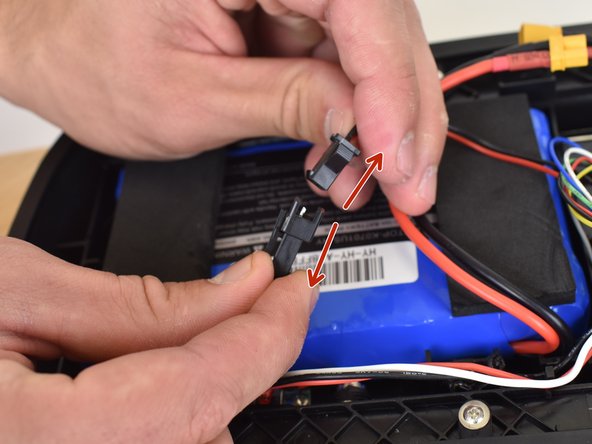
Now pull apart the black wire by gently pulling the two wires in opposite directions.
-
-
-
Once the battery has been disconnected, gently pry the battery upward.
-
Once the battery is freed, remove it with your hands.
-
-




To reassemble your device, follow these instructions in reverse order.
다른 2명이 해당 안내서를 완성하였습니다.

팀

Linn Benton Community College, Team S2-G2, Karnes Fall 2018 Linn Benton Community College, Team S2-G2, Karnes Fall 2018 회원
LBCC-KARNES-F18S2G2
3 회원들
안내서 6개를 작성함
