주요 콘텐츠로 건너뛰기
수리 커뮤니티 가입 - 계정 만들기

How To Clean Nikon Coolpix S30 Lens

필요한 것

    1. How To Clean Nikon Coolpix S30 Lens, Batteries: 1 단계, 이미지 2개 중 1개 How To Clean Nikon Coolpix S30 Lens, Batteries: 1 단계, 이미지 2개 중 2개
      • Slide the battery cover to the right.

      • The hinge is on the left side of the cover which will allow the cover to stay attached.

      댓글 쓰기

    2. How To Clean Nikon Coolpix S30 Lens: 2 단계, 이미지 2개 중 1개 How To Clean Nikon Coolpix S30 Lens: 2 단계, 이미지 2개 중 2개
      • Slide the second cover (yellow) to the right (similar to the outer cover). This will allow the batteries to be exposed.

      댓글 쓰기

    3. How To Clean Nikon Coolpix S30 Lens: 3 단계, 이미지 1개 중 1개
      • Remove the batteries by gently tipping the camera.

      댓글 쓰기

    1. How To Clean Nikon Coolpix S30 Lens, How To Clean Nikon Coolpix S30 Lens: 4 단계, 이미지 1개 중 1개
      • Remove the four screws the hold the back of the case to the rest of the camera.

      댓글 쓰기

    2. How To Clean Nikon Coolpix S30 Lens: 5 단계, 이미지 1개 중 1개
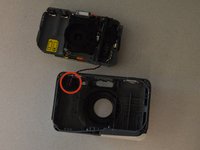
      • Remove the left screw from the bottom of the camera first. This can be done using the same T5 tip.

      • Unscrew the screw on the right using a different attachment: PH000 (it is a small Phillip's head)

      댓글 쓰기

    3. How To Clean Nikon Coolpix S30 Lens: 6 단계, 이미지 1개 중 1개
      • Remove back case from the rest of the camera carefully.

      댓글 쓰기

    4. How To Clean Nikon Coolpix S30 Lens: 7 단계, 이미지 1개 중 1개
      • Remove the three screws the secure the motherboard to the front case.

      댓글 쓰기

    5. How To Clean Nikon Coolpix S30 Lens: 8 단계, 이미지 2개 중 1개 How To Clean Nikon Coolpix S30 Lens: 8 단계, 이미지 2개 중 2개
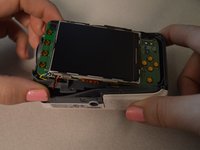
      • Remove the motherboard from the front case.

      • Leave the red and black wire attached but lay the piece in front of the case.

      댓글 쓰기

    6. How To Clean Nikon Coolpix S30 Lens: 9 단계, 이미지 2개 중 1개 How To Clean Nikon Coolpix S30 Lens: 9 단계, 이미지 2개 중 2개
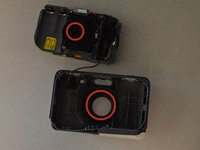
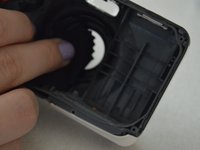
      • Wipe the lens and the clear plastic on the front case to remove debris.

      댓글 쓰기

결론

To reassemble your device, follow these instructions in reverse order.

취소: 해당 안내서를 완성하지 않았습니다.

다른 한 분이 해당 안내서를 완성하였습니다.

작성자

3다른 기여자 명과 함께

Courtney Weida

회원 가입일: 01/21/15

167 평판

안내서 1개를 작성함

Penn State, Team 2-4, Kaschak Winter 2015 Penn State, Team 2-4, Kaschak Winter 2015 회원

PSU-KASCHAK-W15S2G4

4 회원들

안내서 17개를 작성함

1가이드 댓글

The first three steps are redundant because you already included the prerequisite guide for removal of the batteries.

Dylan Keiter - 답글 공유

댓글 쓰기

조회 통계:

지난 24시간: 0

지난 7일: 6

지난 30일: 26

전체 시간: 2,113