주요 콘텐츠로 건너뛰기
수리 커뮤니티 가입 - 계정 만들기

JBL Charge 3 Port Bay Replacement

필요한 것

  1. JBL Charge 3 Port Bay Replacement, Front Cover: 1 단계, 이미지 3개 중 1개 JBL Charge 3 Port Bay Replacement, Front Cover: 1 단계, 이미지 3개 중 2개 JBL Charge 3 Port Bay Replacement, Front Cover: 1 단계, 이미지 3개 중 3개
    • Turn your speaker upside down and insert the plastic opening tool vertically into the slit in the front cover.

    • Slowly pull the plastic opening tool outward to remove the four clips holding the covering in place.

    • Repeat this process for all four edges of the front cover.

    댓글 쓰기

  2. JBL Charge 3 Port Bay Replacement: 2 단계, 이미지 1개 중 1개
    • Pull apart your cover gently from both sides and remove it from the speaker housing.

    • There are screws around the foot of the device that may need loosening to be able to unclip the other side of the cover.

    • The inside of the front cover has holes that must match with their corresponding pins on the speaker housing for proper reassembly.

    • Removing the Front Cover does not affect the waterproof seals of the device. However, removing any further disassembly of your speaker will require removing waterproof seals and gaskets. Your device may no longer be waterproof after these have been altered.

    댓글 쓰기

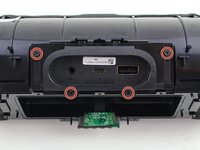
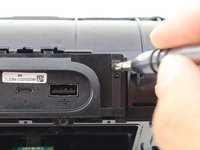
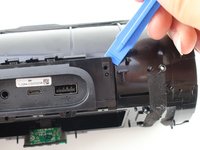
  3. JBL Charge 3 Port Bay Replacement, Port Bay: 3 단계, 이미지 3개 중 1개 JBL Charge 3 Port Bay Replacement, Port Bay: 3 단계, 이미지 3개 중 2개 JBL Charge 3 Port Bay Replacement, Port Bay: 3 단계, 이미지 3개 중 3개
    • Take out the four 8mm Phillips #1 screws out of the port bay cover.

    • Wedge your plastic opening tool around the port bay to remove it.

    댓글 쓰기

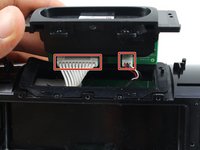
  4. JBL Charge 3 Port Bay Replacement: 4 단계, 이미지 3개 중 1개 JBL Charge 3 Port Bay Replacement: 4 단계, 이미지 3개 중 2개 JBL Charge 3 Port Bay Replacement: 4 단계, 이미지 3개 중 3개
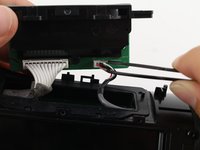
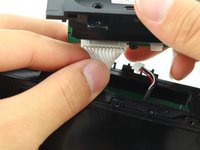
    • Disconnect the two bundled cable connector from the port bay.

    댓글 쓰기

  5. JBL Charge 3 Port Bay Replacement: 5 단계, 이미지 3개 중 1개 JBL Charge 3 Port Bay Replacement: 5 단계, 이미지 3개 중 2개 JBL Charge 3 Port Bay Replacement: 5 단계, 이미지 3개 중 3개
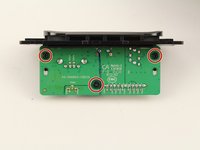
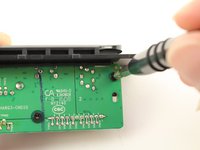
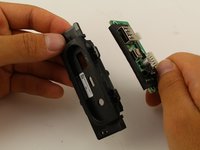
    • Remove the three 8mm Phillips #1 screws from the port bay circuit board.

    • Pull the port bay cover off of the circuit board.

    댓글 쓰기

  6. JBL Charge 3 Port Bay Replacement: 6 단계, 이미지 2개 중 1개 JBL Charge 3 Port Bay Replacement: 6 단계, 이미지 2개 중 2개
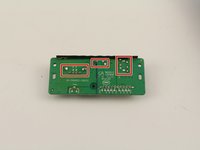
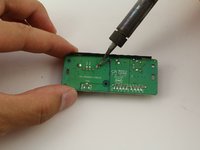
    • Desolder the USB, MicroUSB, or AUX port off of the circuit board.

    댓글 쓰기

결론

To reassemble your device, follow these instructions in reverse order.

취소: 해당 안내서를 완성하지 않았습니다.

다른 41명이 해당 안내서를 완성하였습니다.

작성자

3다른 기여자 명과 함께

Jack Ng

회원 가입일: 10/08/18

2,434 평판

안내서 4개를 작성함

16가이드 댓글

Is there a place to buy an entire replacement port bay?

indecisive_decision - 답글 공유

Found the whole assembly on line for 30 bucks. Or a usb port for five from jbl

bonnie.1964 - 답글 공유

Can u share a link? Need a new port bay!

Max de Groot - 답글 공유

Hello! My jbl charge 3 has a problem in bluetooth, I can't detect the bluetooth in any gadget. Is there anybody have an idea how to fix this?

ebataluna - 답글 공유

anyone have the charging ways of this board i have 2 pads missing and would like to run the lines

Juju B - 답글 공유

댓글 쓰기

조회 통계:

지난 24시간: 13

지난 7일: 84

지난 30일: 363

전체 시간: 70,269