주요 콘텐츠로 건너뛰기
수리 커뮤니티 가입 - 계정 만들기

Jabra Elite 85h Microphone Replacement

필요한 것

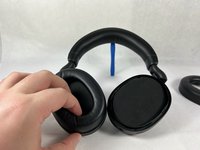
    1. Jabra Elite 85h Microphone Replacement, Ear Cushion: 1 단계, 이미지 3개 중 1개 Jabra Elite 85h Microphone Replacement, Ear Cushion: 1 단계, 이미지 3개 중 2개 Jabra Elite 85h Microphone Replacement, Ear Cushion: 1 단계, 이미지 3개 중 3개
      • Remove each ear cushion by hooking your fingers along the inside of the ear cushion and pulling up and away from the ear cup.

      • If the cushion does not fully release, move your hand to the opposite side and pull up inn the same manner.

      댓글 쓰기

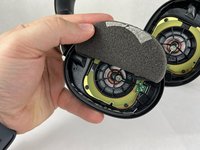
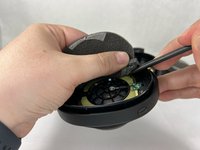
    1. Jabra Elite 85h Microphone Replacement, Speaker: 2 단계, 이미지 3개 중 1개 Jabra Elite 85h Microphone Replacement, Speaker: 2 단계, 이미지 3개 중 2개 Jabra Elite 85h Microphone Replacement, Speaker: 2 단계, 이미지 3개 중 3개
      • The foam inserts and backing tape are very delicate. Take your time when removing them, and be careful to not rip or tear the material.

      • Using the small plastic spudger to assist, begin lifting up and removing the foam inserts with attached backing tape.

      댓글 쓰기

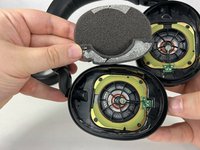
    2. Jabra Elite 85h Microphone Replacement: 3 단계, 이미지 3개 중 1개 Jabra Elite 85h Microphone Replacement: 3 단계, 이미지 3개 중 2개 Jabra Elite 85h Microphone Replacement: 3 단계, 이미지 3개 중 3개
      • Repeat the previous steps for the other side, removing the foam inserts with care.

      댓글 쓰기

    3. Jabra Elite 85h Microphone Replacement: 4 단계, 이미지 1개 중 1개
      • Unscrew and remove the four T6 screws holding the speaker in place.

      댓글 쓰기

    4. Jabra Elite 85h Microphone Replacement: 5 단계, 이미지 1개 중 1개
      • Repeat the previous step for the other side, removing the four T6 screws.

      댓글 쓰기

    5. Jabra Elite 85h Microphone Replacement: 6 단계, 이미지 1개 중 1개
      • Tilt the headphones over so that the speaker tilts out of the plastic holder.

      • Repeat for both sides.

      댓글 쓰기

    1. Jabra Elite 85h Microphone Replacement, Microphone: 7 단계, 이미지 2개 중 1개 Jabra Elite 85h Microphone Replacement, Microphone: 7 단계, 이미지 2개 중 2개
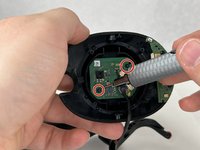
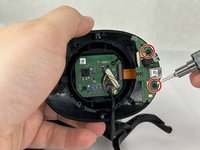
      • Remove the four screws attaching the circuit boards to the headphone enclosure.

      • The microphone is located on the lower circuit board.

      댓글 쓰기

    2. Jabra Elite 85h Microphone Replacement: 8 단계, 이미지 3개 중 1개 Jabra Elite 85h Microphone Replacement: 8 단계, 이미지 3개 중 2개 Jabra Elite 85h Microphone Replacement: 8 단계, 이미지 3개 중 3개
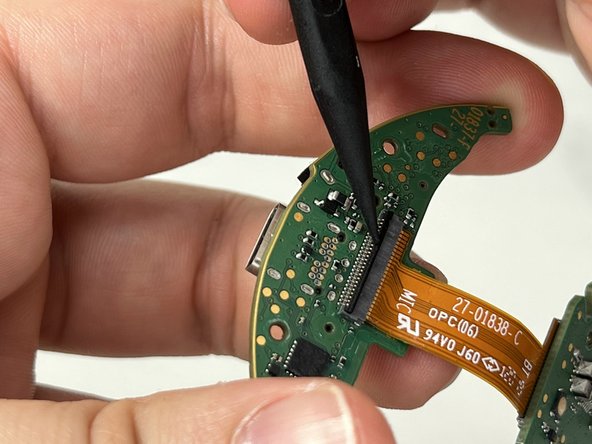
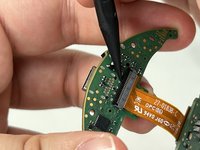
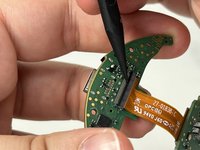
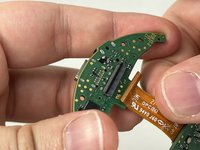
      • Remove the circuit boards from the headphone enclosure.

      • Carefully lift the bar located on the lower circuit board that contains the 24-pin ribbon cable. Remove the cable.

      댓글 쓰기

결론

If the microphone on your Jabra Elite 85h is not working, replacement could be an appropriate solution.

취소: 해당 안내서를 완성하지 않았습니다.

다른 한 분이 해당 안내서를 완성하였습니다.

작성자

1다른 기여자 명과 함께

Ryan Callaghan

회원 가입일: 03/13/23

989 평판

안내서 4개를 작성함

UMass Dartmouth, Team 3-4, Petersen Spring 2023 UMass Dartmouth, Team 3-4, Petersen Spring 2023 회원

UMASSD-PETERSEN-S23S3G4

4 회원들

안내서 24개를 작성함

0가이드 댓글

댓글 쓰기

조회 통계:

지난 24시간: 0

지난 7일: 9

지난 30일: 30

전체 시간: 1,814