소개
The back case of the phone holds the motherboard and back speaker. You need to disassemble the back to replace these items.
필요한 것
-
-
On the back of the phone, place your thumb on the three raised bumps and slide the back cover upward.
 FixBot에 문의하기
-
-
-
이 단계에 사용된 도구:Tweezers$4.99
-
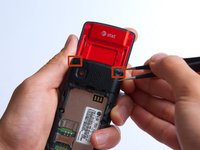
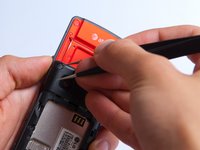
Remove the two screw covers at the top of phone with tweezers.
-
-
-
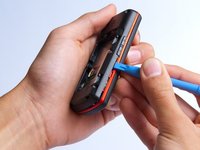
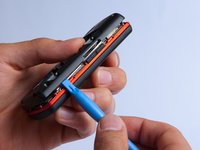
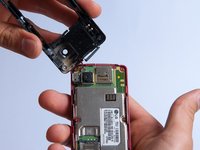
Use the plastic opening tool to pry the back cover off. Insert the tool between the back cover and red mid section and go around the entire phone.
-
-
-
Use the tweezers to remove the red and black wires connecting the speaker to the green motherboard by pinching the sides of the plastic base near the motherboard.
-
Set the back cover with the speaker aside.
-





To reassemble your device, follow these instructions in reverse order.

팀

Cal Poly, Team 4-27, Amido Fall 2013 Cal Poly, Team 4-27, Amido Fall 2013 회원
CPSU-AMIDO-F13S4G27
4 회원들
안내서 35개를 작성함
