주요 콘텐츠로 건너뛰기
수리 커뮤니티 가입 - 계정 만들기

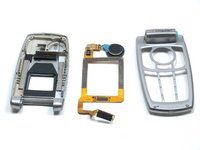
LG L1200 External Housing Replacement

필요한 것

  1. LG L1200 External Housing Replacement, Inner LCD Screen: 1 단계, 이미지 1개 중 1개
    • Make sure you remove the battery by lifting the tab on the back of the phone before opening the case.

    • Flip open the phone and locate the four screw covers.

    댓글 쓰기

  2. LG L1200 External Housing Replacement: 2 단계, 이미지 1개 중 1개
    • Remove all four screw covers by using an IPod opening tool. They should come off relatively easy.

    댓글 쓰기

  3. LG L1200 External Housing Replacement: 3 단계, 이미지 1개 중 1개
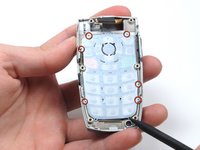
    • Using a T6 Torx screwdriver, remove all four screws.

    댓글 쓰기

  4. LG L1200 External Housing Replacement: 4 단계, 이미지 3개 중 1개 LG L1200 External Housing Replacement: 4 단계, 이미지 3개 중 2개 LG L1200 External Housing Replacement: 4 단계, 이미지 3개 중 3개
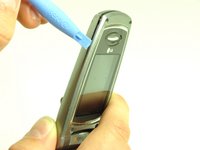
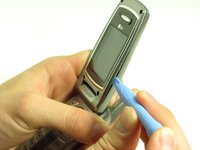
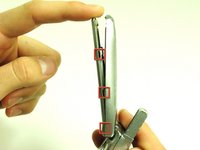
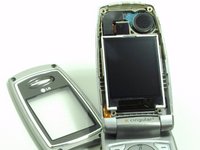
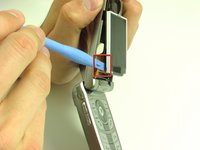
    • Once the screws are removed, use an IPod opening tool to separate the front cover from the inner screen cover.

    • Run the Ipod opening tool down both sides,disconnecting the tabs that hold the covers together.

    댓글 쓰기

  5. LG L1200 External Housing Replacement: 5 단계, 이미지 2개 중 1개 LG L1200 External Housing Replacement: 5 단계, 이미지 2개 중 2개
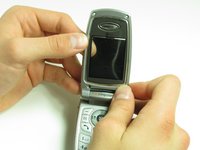
    • Pull the inner screen cover towards you and up in order to separate it from the front cover.

    댓글 쓰기

  6. LG L1200 External Housing Replacement: 6 단계, 이미지 1개 중 1개
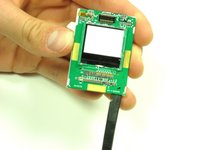
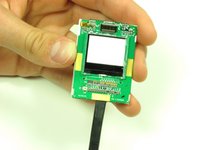
    • Remove the tape from the bottom of the LCD screen.

    댓글 쓰기

  7. LG L1200 External Housing Replacement: 7 단계, 이미지 3개 중 1개 LG L1200 External Housing Replacement: 7 단계, 이미지 3개 중 2개 LG L1200 External Housing Replacement: 7 단계, 이미지 3개 중 3개
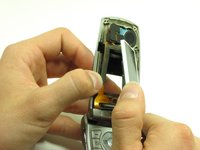
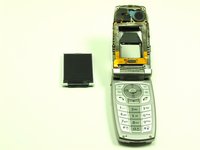
    • Carefully lift the LCD screen and peel it from the gold ribbon. The sticky connection runs all the way around the LCD screen.

    댓글 쓰기

  8. LG L1200 External Housing Replacement: 8 단계, 이미지 3개 중 1개 LG L1200 External Housing Replacement: 8 단계, 이미지 3개 중 2개 LG L1200 External Housing Replacement: 8 단계, 이미지 3개 중 3개
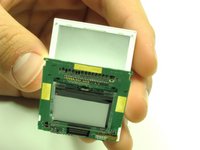
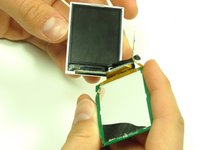
    • Flip the screen over so that you can see the outer LCD screen and the circuit board.

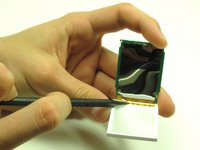
    • Insert spudger in the bottom right corner.

    • Lift up and move the spudger across the bottom.

    • The third photo is rotated 180 degrees.

    댓글 쓰기

  9. LG L1200 External Housing Replacement: 9 단계, 이미지 2개 중 1개 LG L1200 External Housing Replacement: 9 단계, 이미지 2개 중 2개
    • Use the pointy side of the spudger to peel off the interior tape.

    • Flip the assembly over and peel the circuit board from the screen.

    댓글 쓰기

  10. LG L1200 External Housing Replacement: 10 단계, 이미지 2개 중 1개 LG L1200 External Housing Replacement: 10 단계, 이미지 2개 중 2개
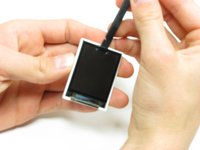
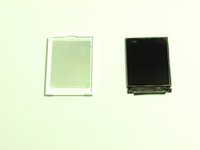
    • Use the spudger to remove the LCD screen from its backing.

    댓글 쓰기

  11. LG L1200 External Housing Replacement, Camera: 11 단계, 이미지 1개 중 1개
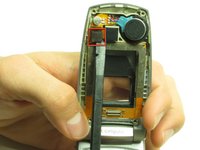
    • Carefully slide the spudger behind the main ribbon in order to separate it from the inside cover of the phone.

    댓글 쓰기

  12. LG L1200 External Housing Replacement: 12 단계, 이미지 2개 중 1개 LG L1200 External Housing Replacement: 12 단계, 이미지 2개 중 2개
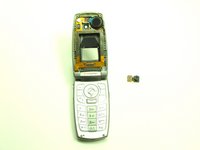
    • Use a spudger to pop off the camera ribbon from the main ribbon. The camera component should separate entirely.

    댓글 쓰기

  13. LG L1200 External Housing Replacement, Logic Board: 13 단계, 이미지 1개 중 1개
    • Make sure you remove the battery by lifting the tab on the back of the phone before opening the case.

    • Poke out rubber covers using a spudger or pointy object, such as a thumb tack.

    댓글 쓰기

  14. LG L1200 External Housing Replacement: 14 단계, 이미지 1개 중 1개
    • Use a T6 torx screwdriver to unscrew the 6 screws that hold the back casing on.

    댓글 쓰기

  15. LG L1200 External Housing Replacement: 15 단계, 이미지 1개 중 1개
    • Use IPod opening tool to separate back housing.

    • There are two tabs located on either side of the phone.

    댓글 쓰기

  16. LG L1200 External Housing Replacement: 16 단계, 이미지 1개 중 1개
    • Separate the back housing from the phone.

    • Be careful not to rip out the wire (highlighted in yellow) when separating the back housing.

    댓글 쓰기

  17. LG L1200 External Housing Replacement: 17 단계, 이미지 1개 중 1개
    • Use a spudger to disconnect antenna wire.

    댓글 쓰기

  18. LG L1200 External Housing Replacement: 18 단계, 이미지 1개 중 1개
    • Use the IPod opening tool to pop out the logic board.

    댓글 쓰기

  19. LG L1200 External Housing Replacement: 19 단계, 이미지 1개 중 1개
    • Use the IPod opening tool to disconnect the main ribbon.

    댓글 쓰기

  20. LG L1200 External Housing Replacement: 20 단계, 이미지 1개 중 1개
    • Once the ribbon is detached, remove the logic board and replace if necessary.

    댓글 쓰기

  21. LG L1200 External Housing Replacement, Keypad: 21 단계, 이미지 1개 중 1개
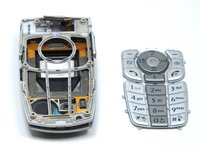
    • The back of the keypad is shown here, next to the logic board (the logic board is turned over to expose the buttons).

    댓글 쓰기

  22. LG L1200 External Housing Replacement: 22 단계, 이미지 2개 중 1개 LG L1200 External Housing Replacement: 22 단계, 이미지 2개 중 2개
    • Using a spudger, lift the keypad off of the tabs.

    댓글 쓰기

  23. LG L1200 External Housing Replacement, External Housing: 23 단계, 이미지 1개 중 1개
    • Wedge a spudger or another harder prying tool in the connection between the top cover and the bottom cover on the right side.

    • Use a large amount of force to push the top cover off the bottom cover's blue extrusion.

    • Too much force may break the plastic of the top cover

    • When separating the top cover from the bottom cover, be careful not to tear the ribbon as you pull it out from the hinge.

    댓글 쓰기

  24. LG L1200 External Housing Replacement: 24 단계, 이미지 2개 중 1개 LG L1200 External Housing Replacement: 24 단계, 이미지 2개 중 2개
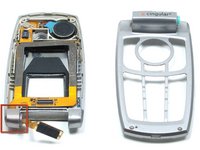
    • Slide the ribbon out of the slot in the joint on the left side.

    • Pull the ribbon out of the top cover with your hand.

    • Once the ribbon is removed, you can replace the covers.

    댓글 쓰기

결론

To reassemble your device, follow these instructions in reverse order.

취소: 해당 안내서를 완성하지 않았습니다.

작성자

4다른 기여자 명과 함께

Joshua Herrmann

회원 가입일: 04/16/10

8 평판

안내서 8개를 작성함

Cal Poly, Team 6-14, Maness Spring 2010 Cal Poly, Team 6-14, Maness Spring 2010 회원

CPSU-MANESS-S10S6G14

4 회원들

안내서 16개를 작성함

0가이드 댓글

댓글 쓰기

조회 통계:

지난 24시간: 2

지난 7일: 8

지난 30일: 48

전체 시간: 1,484