소개
This guide will walk you through the process of replacing a SIM card in your LG Leon LTE.
필요한 것
-
-
First, make sure to turn the phone over so that you are viewing the backside. The battery is located inside the back of the phone.
 FixBot에 문의하기
-
-
-
-
Second, using your opening tool in an upward direction, carefully pry the back of the phone open at the incision area. This can be found at the bottom of the phone. You will now have access to the battery.
-
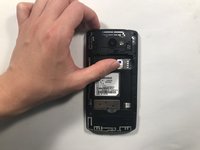
Once you have access to the battery, remove it carefully so that you can get to the SIM card. The SIM card can be seen in the third image.
-
-
-
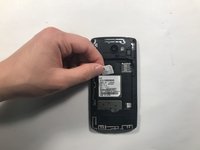
Once the SIM card is accessible, slide it from the SIM holder as demonstrated. Apply a downward force in an outward motion.
-


To reassemble your device, follow these instructions in reverse order.

팀

University of Alabama, Team S1-G3, Bedsole Spring 2018 University of Alabama, Team S1-G3, Bedsole Spring 2018 회원
UA-BEDSOLE-S18S1G3
3 회원들
안내서 15개를 작성함
