주요 콘텐츠로 건너뛰기
수리 커뮤니티 가입 - 계정 만들기

LG Optimus 3D MicroSD/SIM Card Board Replacement

필요한 것

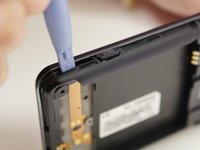
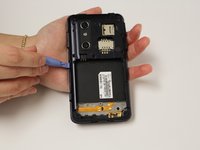
  1. LG Optimus 3D MicroSD/SIM Card Board Replacement, Back Cover Removal: 1 단계, 이미지 2개 중 1개 LG Optimus 3D MicroSD/SIM Card Board Replacement, Back Cover Removal: 1 단계, 이미지 2개 중 2개
    • Pry the back cover off of the phone with your fingernail. There is a notch located at the bottom of the phone for improved leverage.

  2. LG Optimus 3D MicroSD/SIM Card Board Replacement, Battery Removal: 2 단계, 이미지 3개 중 1개 LG Optimus 3D MicroSD/SIM Card Board Replacement, Battery Removal: 2 단계, 이미지 3개 중 2개 LG Optimus 3D MicroSD/SIM Card Board Replacement, Battery Removal: 2 단계, 이미지 3개 중 3개
    • The battery is the large black rectangle towards the bottom half of the phone.

    • There is a semi-circular notch at the bottom edge of the battery. Press against and up on the battery to pop it out.

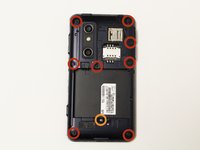
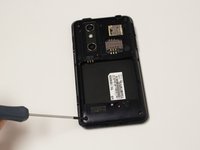
  3. LG Optimus 3D MicroSD/SIM Card Board Replacement, Screw Removal: 3 단계, 이미지 2개 중 1개 LG Optimus 3D MicroSD/SIM Card Board Replacement, Screw Removal: 3 단계, 이미지 2개 중 2개
    • Remove 9 screws from the phone. The locations of these screws are circled in the picture.

    • 5.5mm length PH00 screws

    • 4mm length PH00 screws

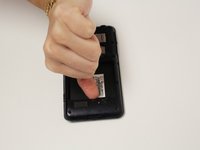
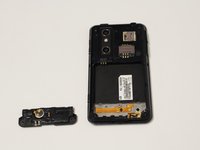
  4. LG Optimus 3D MicroSD/SIM Card Board Replacement, Bottom Cover Removal: 4 단계, 이미지 2개 중 1개 LG Optimus 3D MicroSD/SIM Card Board Replacement, Bottom Cover Removal: 4 단계, 이미지 2개 중 2개
    • Gently pull down on the bottom cover to remove it.

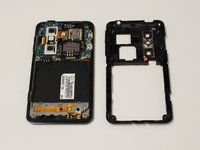
  5. LG Optimus 3D MicroSD/SIM Card Board Replacement, Mid-Cover Bezel Removal: 5 단계, 이미지 3개 중 1개 LG Optimus 3D MicroSD/SIM Card Board Replacement, Mid-Cover Bezel Removal: 5 단계, 이미지 3개 중 2개 LG Optimus 3D MicroSD/SIM Card Board Replacement, Mid-Cover Bezel Removal: 5 단계, 이미지 3개 중 3개
    • Using a plastic opening tool, gently pry around the perimeter of the device.

    • The ribbons behind the buttons and ports are very delicate. Make sure you do not run your plastic opening tool too deep into the bezel, as you could damage them.

    • The button covers rest under the Mid-Cover Bezel. Remove them and set aside.

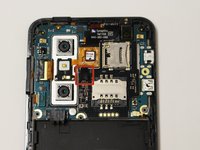
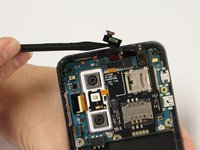
  6. LG Optimus 3D MicroSD/SIM Card Board Replacement, Ribbon Cable Disconnection: 6 단계, 이미지 2개 중 1개 LG Optimus 3D MicroSD/SIM Card Board Replacement, Ribbon Cable Disconnection: 6 단계, 이미지 2개 중 2개
    • Using a spudger or plastic opening tool, gently disconnect the ribbon cable attached to the black SIM card board.

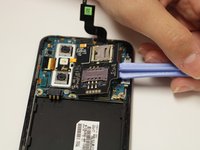
  7. LG Optimus 3D MicroSD/SIM Card Board Replacement, Adhesive Loosening: 7 단계, 이미지 1개 중 1개
    • Use a hair-dryer on high, or a heat-gun on low to heat the device and loosen the adhesive which holds down the SD/SIM Card Board.

    • Evenly heat the device in short intervals for about one minute.

    • Do not heat the device for more than 30 seconds at a time to prevent over-heating.

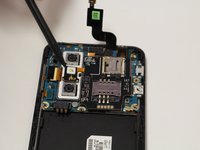
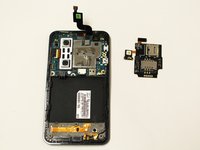
  8. LG Optimus 3D MicroSD/SIM Card Board Replacement, SD/SIM Card Board Removal: 8 단계, 이미지 3개 중 1개 LG Optimus 3D MicroSD/SIM Card Board Replacement, SD/SIM Card Board Removal: 8 단계, 이미지 3개 중 2개 LG Optimus 3D MicroSD/SIM Card Board Replacement, SD/SIM Card Board Removal: 8 단계, 이미지 3개 중 3개
    • Gently pry the board up to release it from the now soft adhesive. Make sure you pry up the little tab connected to the camera unit as well.

    • If the board is too difficult to separate than more heating may be required.

결론

To reassemble your device, follow these instructions in reverse order.

작성자

4다른 기여자 명과 함께

Dale Pearson

회원 가입일: 09/22/14

784 평판

안내서 6개를 작성함

USF Tampa, Team 10-6, Brown Fall 2014 USF Tampa, Team 10-6, Brown Fall 2014 회원

USFT-BROWN-F14S10G6

3 회원들

안내서 6개를 작성함

0가이드 댓글

댓글 쓰기

조회 통계:

지난 24시간: 5

지난 7일: 17

지난 30일: 43

전체 시간: 1,120