주요 콘텐츠로 건너뛰기
수리 커뮤니티 가입 - 계정 만들기

LG Optimus L7 P705 Home Button Replacement

필요한 것

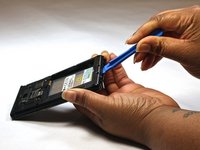
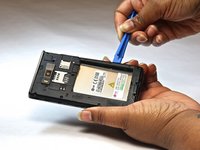
  1. LG Optimus L7 P705 Home Button Replacement, Home Button: 1 단계, 이미지 2개 중 1개 LG Optimus L7 P705 Home Button Replacement, Home Button: 1 단계, 이미지 2개 중 2개
    • Insert a plastic opening tool between the seams of the device and pry the back cover away from the phone.

    • Remove the battery and SIM card.

  2. LG Optimus L7 P705 Home Button Replacement: 2 단계, 이미지 1개 중 1개
    • Remove the twelve screws using the Phillips 000 screwdriver.

  3. LG Optimus L7 P705 Home Button Replacement: 3 단계, 이미지 1개 중 1개
    • Remove bottom plate where the charger port is located.

  4. LG Optimus L7 P705 Home Button Replacement: 4 단계, 이미지 2개 중 1개 LG Optimus L7 P705 Home Button Replacement: 4 단계, 이미지 2개 중 2개
    • Insert a plastic opening tool between the seams of the device and apply some pressure to lift off the cover.

  5. LG Optimus L7 P705 Home Button Replacement: 5 단계, 이미지 1개 중 1개
    • Flip over to the face of the device.

    • Lift off the glass screen (display).

  6. LG Optimus L7 P705 Home Button Replacement: 6 단계, 이미지 1개 중 1개
    • Remove the home screen button. Replace as needed.

결론

To reassemble your device, follow these instructions in reverse order.

다른 한 분이 해당 안내서를 완성하였습니다.

작성자

5다른 기여자 명과 함께

Bruna

회원 가입일: 10/08/14

525 평판

안내서 4개를 작성함

USF Tampa, Team 9-1, Leahy Fall 2014 USF Tampa, Team 9-1, Leahy Fall 2014 회원

USFT-LEAHY-F14S9G1

3 회원들

안내서 5개를 작성함

1가이드 댓글

in the step 2, one red ring is in the wrong position.

The ring in the midle at the left side is in the center of the telephone

Tiago - 답글

댓글 쓰기

조회 통계:

지난 24시간: 0

지난 7일: 2

지난 30일: 15

전체 시간: 1,940