소개
Before replacing the battery, turn off the LG V10. If your LG V10 is being charged for a couple hours but quickly drains even when it’s not being used, for example the battery percentage goes from 100% to 95% within ten minutes of being unplugged, then the battery’s life has been depleted and may need to be replaced.
필요한 것
-
-
-
Wedge the flat end of the plastic spudger, or the tip of your finger, in between the back cover and the LG V10’s charging port.
-
Carefully lift up on the spudger or with your finger so that the back cover pops up. The rest of the back cover should easily come off by sliding a finger or spudger under the back cover and around the sides.
 FixBot에 문의하기
-
-
-
-
There’s an impression next to the battery for the user to use their finger to pry the battery out; pry the battery out using your finger or the flat end of the spudger.
-
-


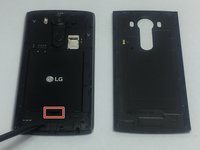

After replacing the old battery with a new one, reattach the back cover and press down on all sides to make sure it's properly reattached.
다른 3명이 해당 안내서를 완성하였습니다.


