소개
If your LeapFrog Scribble and Write won't power on, there may be an issue with the batteries. Your batteries may be drained and in need of replacing, or the battery compartment could have a buildup of debris (dirt, dust, etc.) preventing the batteries from working properly.
필요한 것
-
-
-
Use a Phillips head screwdriver to remove the screw from the battery compartment on the back of the toy.
 FixBot에 문의하기
-
-
-
-
In a small cup, combine a little baking soda and water to create a pasty solution.
-
-


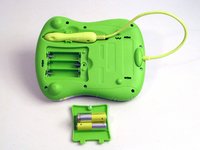


To reassemble your device, follow these instructions in reverse order.
다른 한 분이 해당 안내서를 완성하였습니다.

팀

USF Tampa, Team 1-5, Nance Spring 2016 USF Tampa, Team 1-5, Nance Spring 2016 회원
USFT-NANCE-S16S1G5
3 회원들
안내서 10개를 작성함
