주요 콘텐츠로 건너뛰기
수리 커뮤니티 가입 - 계정 만들기

Leapfrog LeapPad 3 Battery Replacement

필요한 것

    1. Leapfrog LeapPad 3 Battery Replacement, Battery: 1 단계, 이미지 3개 중 1개 Leapfrog LeapPad 3 Battery Replacement, Battery: 1 단계, 이미지 3개 중 2개 Leapfrog LeapPad 3 Battery Replacement, Battery: 1 단계, 이미지 3개 중 3개
      이 단계에 사용된 도구:
      Anti-Static Wrist Strap
      $7.95
      • Before taking apart your device, ensure that it is turned off and that your anti-static wrist strap is secured to a ground.

      • Remove the six 10.0 mm Phillips #0 screws from the outer case and remove the cover with your hands.

      • You will not need to pry the case off.

      댓글 쓰기

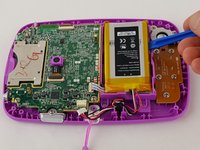
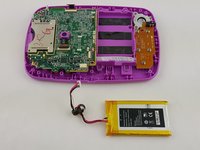
    2. Leapfrog LeapPad 3 Battery Replacement: 2 단계, 이미지 3개 중 1개 Leapfrog LeapPad 3 Battery Replacement: 2 단계, 이미지 3개 중 2개 Leapfrog LeapPad 3 Battery Replacement: 2 단계, 이미지 3개 중 3개
      • Unplug the battery from the motherboard with your hands.

      • The battery sits to the right of the motherboard.

      댓글 쓰기

    3. Leapfrog LeapPad 3 Battery Replacement: 3 단계, 이미지 2개 중 1개 Leapfrog LeapPad 3 Battery Replacement: 3 단계, 이미지 2개 중 2개
      • Pry the battery gently off of the plastic platform with an opening tool.

      • Do not to puncture the battery, as the material inside can be dangerous.

      댓글 쓰기

결론

To reassemble your device, follow these instructions in reverse order.

취소: 해당 안내서를 완성하지 않았습니다.

다른 3명이 해당 안내서를 완성하였습니다.

작성자

6다른 기여자 명과 함께

Matt Irvine

회원 가입일: 02/04/16

952 평판

안내서 6개를 작성함

USF Tampa, Team 16-2, Blackwell Winter 2016 USF Tampa, Team 16-2, Blackwell Winter 2016 회원

USFT-BLACKWELL-W16S16G2

3 회원들

안내서 12개를 작성함

1가이드 댓글

where can i purchase a battery, i have googled and come up with nothing.

martinez2503 - 답글 공유

댓글 쓰기

조회 통계:

지난 24시간: 3

지난 7일: 16

지난 30일: 56

전체 시간: 5,046