소개
This guide will give you a step-by-step process for replacing the battery on the Lenovo Edge 15 laptop. You will need to remove the back-cover first. Caution: If battery is leaking do not touch it with your hands.
필요한 것
-
-
-
Locate the eleven M2 x 6.0mm back-cover screws.
-
Unscrew the screws using the Phillips #0 screwdriver.
 FixBot에 문의하기
-
-
-
Gently lift the cover plate off the body of the laptop, ensuring that it does not pull on any components such as the USB ports.
-
-
-
-
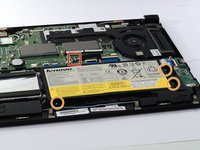
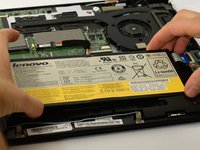
Locate the battery-connector and the three, M2 x 4.0mm screws holding the battery in place.
-
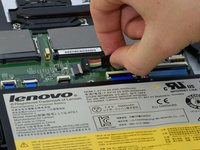
Carefully unplug the battery-connector, wiggling the connector side to side if needed.
-
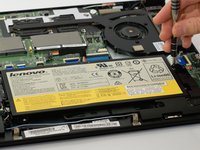
Unscrew the 3-screws using the Phillips # 0 screwdriver.
-
-




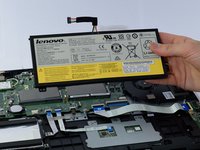
To reassemble your device, follow these instructions in reverse order.
다른 5명이 해당 안내서를 완성하였습니다.

팀

Cal Poly, Team S8-G1, Banghart Fall 2017 Cal Poly, Team S8-G1, Banghart Fall 2017 회원
CPSU-BANGHART-F17S8G1
5 회원들
안내서 28개를 작성함
3가이드 댓글
My laptop caught on fire don't recommend
Rahem Gang - 답글 공유
talvez alguien sabe donde puedo conseguir esta bateria o en que precio puede estar.
ToplayVid :v - 답글 공유
