주요 콘텐츠로 건너뛰기
수리 커뮤니티 가입 - 계정 만들기

Lenovo ThinkPad Yoga Keyboard Replacement

필요한 것

  1. Lenovo ThinkPad Yoga Keyboard Replacement, Battery: 1 단계, 이미지 3개 중 1개 Lenovo ThinkPad Yoga Keyboard Replacement, Battery: 1 단계, 이미지 3개 중 2개 Lenovo ThinkPad Yoga Keyboard Replacement, Battery: 1 단계, 이미지 3개 중 3개
    • Flip the laptop over so the bottom is facing you.

    • Remove the ten screws using a Phillips #1 screwdriver.

    • Using the plastic opening tool, pry the bottom cover off the laptop.

  2. Lenovo ThinkPad Yoga Keyboard Replacement: 2 단계, 이미지 3개 중 1개 Lenovo ThinkPad Yoga Keyboard Replacement: 2 단계, 이미지 3개 중 2개 Lenovo ThinkPad Yoga Keyboard Replacement: 2 단계, 이미지 3개 중 3개
    • Remove two screws from the battery using a Phillips #1 screwdriver.

    • Disconnect the battery connector from the motherboard.

    • Remove the battery from the laptop.

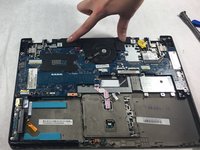
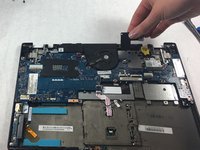
  3. Lenovo ThinkPad Yoga Keyboard Replacement, Speakers: 3 단계, 이미지 3개 중 1개 Lenovo ThinkPad Yoga Keyboard Replacement, Speakers: 3 단계, 이미지 3개 중 2개 Lenovo ThinkPad Yoga Keyboard Replacement, Speakers: 3 단계, 이미지 3개 중 3개
    • Disconnect connectors. Use fingers to pinch and pull the connector out.

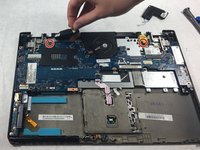
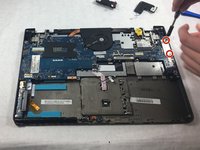
  4. Lenovo ThinkPad Yoga Keyboard Replacement, Fan: 4 단계, 이미지 3개 중 1개 Lenovo ThinkPad Yoga Keyboard Replacement, Fan: 4 단계, 이미지 3개 중 2개 Lenovo ThinkPad Yoga Keyboard Replacement, Fan: 4 단계, 이미지 3개 중 3개
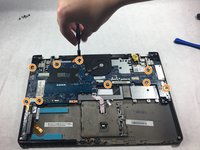
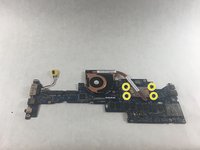
    • Remove the two screws from the retainer for the ports using a Phillips #1 screwdriver.

    • Remove the nine screws from the motherboard using a Phillips #1 screwdriver.

    • Remove the four screws from the fan under the motherboard using a Phillips #1 screwdriver.

    • Remove the fan from the motherboard.

  5. Lenovo ThinkPad Yoga Keyboard Replacement, Keyboard: 5 단계, 이미지 1개 중 1개
    • Remove twelve screws from the midframe using a Phillips #1 screwdriver.

  6. Lenovo ThinkPad Yoga Keyboard Replacement: 6 단계, 이미지 1개 중 1개
    • Use a spudger to pry open the keyboard panel.

    • Continue to pry until the panel is loose enough to take off.

  7. Lenovo ThinkPad Yoga Keyboard Replacement: 7 단계, 이미지 1개 중 1개
    • Remove the keyboard from the laptop.

결론

To reassemble your device, follow these instructions in reverse order.

다른 2명이 해당 안내서를 완성하였습니다.

작성자

2다른 기여자 명과 함께

Felicia McCarey

회원 가입일: 10/28/21

299 평판

안내서 2개를 작성함

UMass Dartmouth, Team 4-4, Gulbrandsen Fall 2021 UMass Dartmouth, Team 4-4, Gulbrandsen Fall 2021 회원

UMASSD-GULBRANDSEN-F21S4G4

3 회원들

안내서 10개를 작성함

0가이드 댓글

댓글 쓰기

조회 통계:

지난 24시간: 2

지난 7일: 26

지난 30일: 164

전체 시간: 11,328