소개
Does your Levoit LV-H132 have increased noise when it's switched on, have decreased airflow, have unusual odors, or a visibly clogged filter? If so, use this guide to replace the filter. This repair is necessary so that the air filters are functioning as intended. There are no required tools to access or change the filter. Before starting, make sure the device is unplugged. By the end of this guide your device will work better.
-
-
-
Orient your air purifier so that the control panel faces the bottom and the filter cover faces towards you.
-
Rotate the filter cover counterclockwise to separate the filter cover from the unit.
 FixBot에 문의하기
-
-
-
-
By grabbing the two white tabs on each side, pull the tab upwards to remove the filter.
-
-


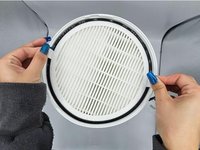
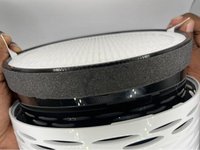
To reassemble your device, follow these instructions in reverse order.
다른 2명이 해당 안내서를 완성하였습니다.

팀

University of North Texas, Team 2-3, Harold Fall 2023 University of North Texas, Team 2-3, Harold Fall 2023 회원
UNT-HAROLD-F23S2G3
4 회원들
안내서 5개를 작성함
