주요 콘텐츠로 건너뛰기
수리 커뮤니티 가입 - 계정 만들기

Linsay Model F-7HD2CORE Battery Replacement

필요한 것

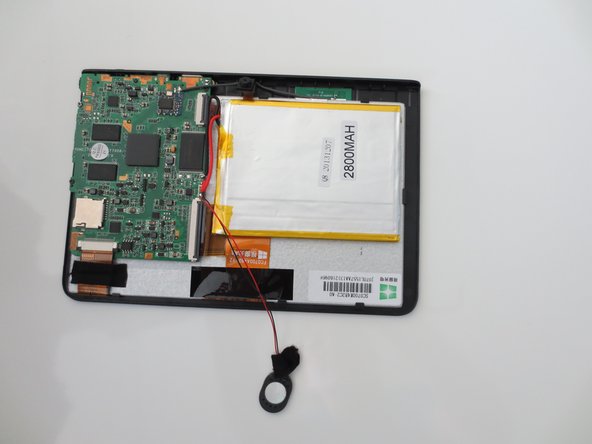
  1. Linsay Model F-7HD2CORE Battery Replacement, Battery: 1 단계, 이미지 3개 중 1개 Linsay Model F-7HD2CORE Battery Replacement, Battery: 1 단계, 이미지 3개 중 2개 Linsay Model F-7HD2CORE Battery Replacement, Battery: 1 단계, 이미지 3개 중 3개
    • Carefully insert your plastic opening tool in between the white and black sections of your device.

    • Gently pry the top screen portion from the base of the tablet.

    • Your tablet should now look like the third image.

  2. Linsay Model F-7HD2CORE Battery Replacement: 2 단계, 이미지 2개 중 1개 Linsay Model F-7HD2CORE Battery Replacement: 2 단계, 이미지 2개 중 2개
    • To completely remove the base from the top of the tablet, peel the microphone from the back.

  3. Linsay Model F-7HD2CORE Battery Replacement: 3 단계, 이미지 2개 중 1개 Linsay Model F-7HD2CORE Battery Replacement: 3 단계, 이미지 2개 중 2개
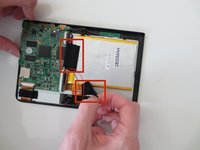
    • Remove the two pieces of tape holding the battery in place by gently peeling it off.

  4. Linsay Model F-7HD2CORE Battery Replacement: 4 단계, 이미지 1개 중 1개
    • Using the spudger, carefully peel the battery off of the tablet panel.

    • Tape of the back of the battery will be very strong, pull gently!

    • The metal exterior of the battery can be quite pliable. Use caution when removing the battery from the tablet.

  5. Linsay Model F-7HD2CORE Battery Replacement: 5 단계, 이미지 1개 중 1개
    • To remove the battery, completely desolder the wires connected to the circuit board.

    • To reattach the new battery, you must solder the wires back on.

결론

To reassemble your device, follow these instructions in reverse order.

다른 2명이 해당 안내서를 완성하였습니다.

작성자

3다른 기여자 명과 함께

Lindsay Byrnes

회원 가입일: 01/28/15

495 평판

안내서 2개를 작성함

Penn State, Team 1-5, Kaschak Winter 2015 Penn State, Team 1-5, Kaschak Winter 2015 회원

PSU-KASCHAK-W15S1G5

3 회원들

안내서 2개를 작성함

0가이드 댓글

댓글 쓰기

조회 통계:

지난 24시간: 0

지난 7일: 1

지난 30일: 11

전체 시간: 1,679