주요 콘텐츠로 건너뛰기
수리 커뮤니티 가입 - 계정 만들기

Logitech G502 Proteus Core Mouse Feet Replacement

필요한 것

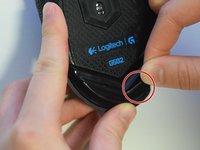
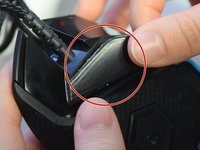
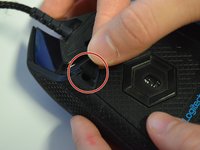
  1. Logitech G502 Proteus Core Mouse Feet Replacement, Mouse Feet: 1 단계, 이미지 3개 중 1개 Logitech G502 Proteus Core Mouse Feet Replacement, Mouse Feet: 1 단계, 이미지 3개 중 2개 Logitech G502 Proteus Core Mouse Feet Replacement, Mouse Feet: 1 단계, 이미지 3개 중 3개
    • Use your fingers or a nylon spudger to peel the old feet off all three corners where the screw holes are exposed.

  2. Logitech G502 Proteus Core Mouse Feet Replacement: 2 단계, 이미지 3개 중 1개 Logitech G502 Proteus Core Mouse Feet Replacement: 2 단계, 이미지 3개 중 2개 Logitech G502 Proteus Core Mouse Feet Replacement: 2 단계, 이미지 3개 중 3개
    • Peel the backing off the new mouse feet to reveal the adhesive.

  3. Logitech G502 Proteus Core Mouse Feet Replacement: 3 단계, 이미지 3개 중 1개 Logitech G502 Proteus Core Mouse Feet Replacement: 3 단계, 이미지 3개 중 2개 Logitech G502 Proteus Core Mouse Feet Replacement: 3 단계, 이미지 3개 중 3개
    • Apply the new mouse feet to their designated areas based on shape.

  4. Logitech G502 Proteus Core Mouse Feet Replacement: 4 단계, 이미지 1개 중 1개
    • Apply even pressure across the mouse feet to ensure adherence.

  5. Logitech G502 Proteus Core Mouse Feet Replacement: 5 단계, 이미지 1개 중 1개
    • Let adhesive sit for about 5-10 minutes with applied pressure.

결론

To reassemble your device, follow these instructions in reverse order.

다른 4명이 해당 안내서를 완성하였습니다.

작성자

6다른 기여자 명과 함께

Sage Farray

회원 가입일: 04/10/17

547 평판

안내서 3개를 작성함

UW Tacoma, Team S3-G1, Liner Spring 2017 UW Tacoma, Team S3-G1, Liner Spring 2017 회원

UWT-LINER-S17S3G1

4 회원들

안내서 11개를 작성함

1가이드 댓글

You completely omitted half of the feet located on the mouse. The ones left out are the 3 located on the removable panel: there are 2 “v” shaped ones around the sensor and the one to the right of the “v” shapes.

Robert - 답글

댓글 쓰기

조회 통계:

지난 24시간: 1

지난 7일: 9

지난 30일: 26

전체 시간: 11,585