소개
Use this prerequisite guide as an initial step before accessing the internal components of the speaker.
필요한 것
-
-
-
Unscrew the two black flat-top screws that attach the handle to the speaker with your hands.
 FixBot에 문의하기
-
-
-
-
-
-
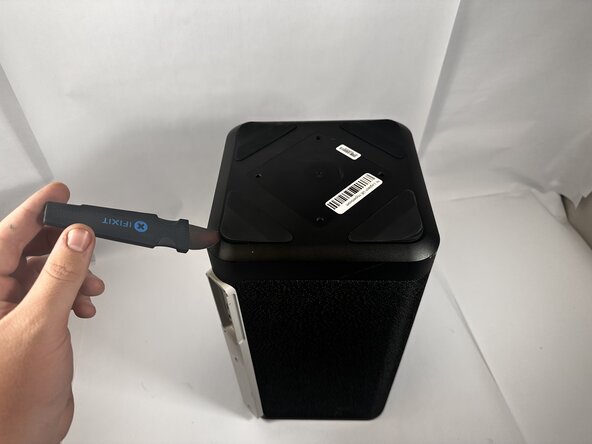
Use the Jimmy to pry off the four rubber feet on the bottom of the speaker.
-
-
-
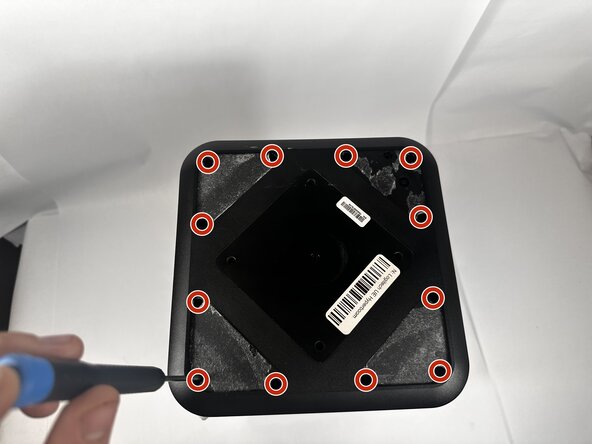
Use a Phillips #0 screwdriver to remove all twelve 11.7mm screws from the bottom panel of the speaker.
-
Pull the panel off to access the internal components.
-
-






To reassemble your device, follow these instructions in reverse order.
다른 한 분이 해당 안내서를 완성하였습니다.

팀

Idaho State University, Team 1-2, Watkins Spring 2026 Idaho State University, Team 1-2, Watkins Spring 2026 회원
ISU-WATKINS-S26S1G2
3 회원들
안내서 40개를 작성함
