주요 콘텐츠로 건너뛰기
수리 커뮤니티 가입 - 계정 만들기

MSI GP60 2PE Leopard Wireless Card Replacement

필요한 것

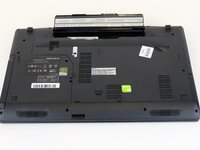
  1. MSI GP60 2PE Leopard Wireless Card Replacement, Battery: 1 단계, 이미지 1개 중 1개
    • Flip MSI GP60 2PE Leopard, so that the back is facing up.

    댓글 쓰기

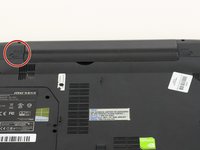
  2. MSI GP60 2PE Leopard Wireless Card Replacement: 2 단계, 이미지 1개 중 1개
    • Find the unlock tab located on the upper right side of the device, then slide it to the right.

    댓글 쓰기

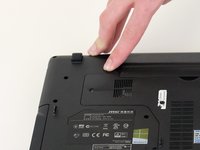
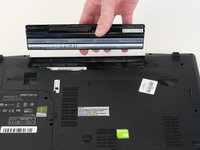
  3. MSI GP60 2PE Leopard Wireless Card Replacement: 3 단계, 이미지 3개 중 1개 MSI GP60 2PE Leopard Wireless Card Replacement: 3 단계, 이미지 3개 중 2개 MSI GP60 2PE Leopard Wireless Card Replacement: 3 단계, 이미지 3개 중 3개
    • Slide and hold the release tab on the left side of the battery, so that you can remove the battery.

    댓글 쓰기

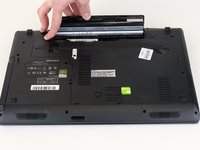
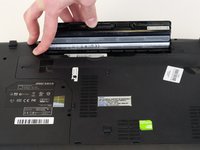
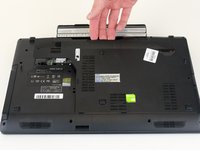
  4. MSI GP60 2PE Leopard Wireless Card Replacement: 4 단계, 이미지 3개 중 1개 MSI GP60 2PE Leopard Wireless Card Replacement: 4 단계, 이미지 3개 중 2개 MSI GP60 2PE Leopard Wireless Card Replacement: 4 단계, 이미지 3개 중 3개
    • While holding the release tab, remove the battery slowly.

    댓글 쓰기

  5. MSI GP60 2PE Leopard Wireless Card Replacement, Back Panel: 5 단계, 이미지 1개 중 1개
    • Flip the device over so the back is facing up.

    댓글 쓰기

  6. MSI GP60 2PE Leopard Wireless Card Replacement: 6 단계, 이미지 2개 중 1개 MSI GP60 2PE Leopard Wireless Card Replacement: 6 단계, 이미지 2개 중 2개
    • Remove the four 5mm screws from the back of the device using a Phillips #00 screwdriver.

    • There is a screw located under the battery; lift the battery up to access it.

    댓글 쓰기

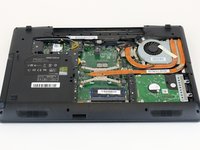
  7. MSI GP60 2PE Leopard Wireless Card Replacement: 7 단계, 이미지 2개 중 1개 MSI GP60 2PE Leopard Wireless Card Replacement: 7 단계, 이미지 2개 중 2개
    • Once all four screws are removed, lift the back off.

    댓글 쓰기

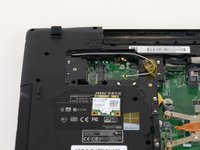
  8. MSI GP60 2PE Leopard Wireless Card Replacement, Wireless Card: 8 단계, 이미지 1개 중 1개
    • Locate the wireless card.

    댓글 쓰기

  9. MSI GP60 2PE Leopard Wireless Card Replacement: 9 단계, 이미지 1개 중 1개
    • Using a Phillips #00 screwdriver, remove the one 2 mm screw that is holding the wireless card in place.

    댓글 쓰기

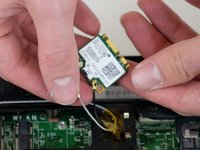
  10. MSI GP60 2PE Leopard Wireless Card Replacement: 10 단계, 이미지 1개 중 1개
    • Carefully remove the wireless card.

    • Pay close attention to the two wires attached to wireless card.

    댓글 쓰기

  11. MSI GP60 2PE Leopard Wireless Card Replacement: 11 단계, 이미지 2개 중 1개 MSI GP60 2PE Leopard Wireless Card Replacement: 11 단계, 이미지 2개 중 2개
    • Remove the wires connecting to the wireless card by pinching around the base where they connect, then carefully disconnect them.

    • The wires should come off fairly easily.

    • Avoid yanking or pulling too hard. This can result in the wires breaking.

    댓글 쓰기

결론

To reassemble your device, follow these instructions in reverse order.

취소: 해당 안내서를 완성하지 않았습니다.

다른 2명이 해당 안내서를 완성하였습니다.

작성자

4다른 기여자 명과 함께

Zoey Calcagno

회원 가입일: 10/04/18

672 평판

안내서 5개를 작성함

0가이드 댓글

댓글 쓰기

조회 통계:

지난 24시간: 0

지난 7일: 4

지난 30일: 43

전체 시간: 2,195