주요 콘텐츠로 건너뛰기
수리 커뮤니티 가입 - 계정 만들기

Merch Source Projector Entertainment II Light Bulb Replacement

필요한 것

  1. Merch Source Projector Entertainment II Light Bulb Replacement, Outer Casing: 1 단계, 이미지 2개 중 1개 Merch Source Projector Entertainment II Light Bulb Replacement, Outer Casing: 1 단계, 이미지 2개 중 2개
    • Flip the projector onto its back and unscrew the nine 15mm screws using the Phillips #0 screw driver.

    댓글 쓰기

  2. Merch Source Projector Entertainment II Light Bulb Replacement: 2 단계, 이미지 1개 중 1개
    • Flip the projector right side up and unscrew the two 12mm screws on the light bulb panel located at the rear of the projector with a Phillips #0 screw head.

    • The bottom right panel screw does not come completely out the panel door.

    댓글 쓰기

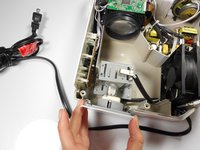
  3. Merch Source Projector Entertainment II Light Bulb Replacement: 3 단계, 이미지 2개 중 1개 Merch Source Projector Entertainment II Light Bulb Replacement: 3 단계, 이미지 2개 중 2개
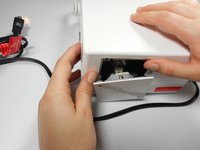
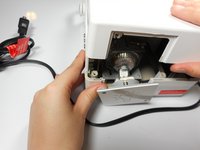
    • Using your hands, gently pry the top and bottom of the projector casing apart.

    댓글 쓰기

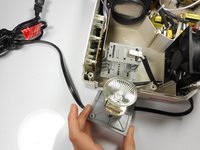
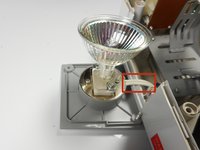
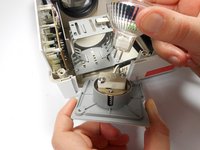
  4. Merch Source Projector Entertainment II Light Bulb Replacement, Remove light bulb assembly from housing unit: 4 단계, 이미지 3개 중 1개 Merch Source Projector Entertainment II Light Bulb Replacement, Remove light bulb assembly from housing unit: 4 단계, 이미지 3개 중 2개 Merch Source Projector Entertainment II Light Bulb Replacement, Remove light bulb assembly from housing unit: 4 단계, 이미지 3개 중 3개
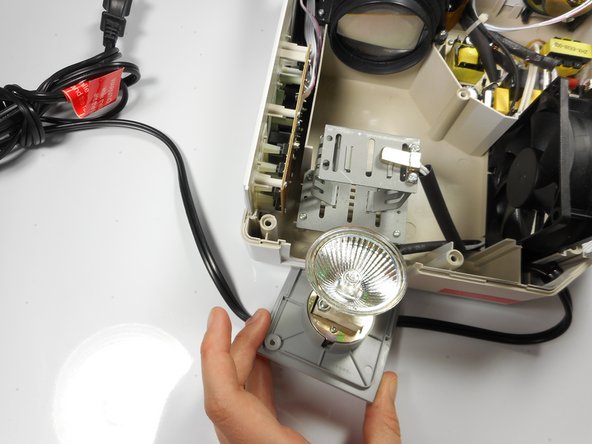
    • Remove the light bulb from its housing unit.

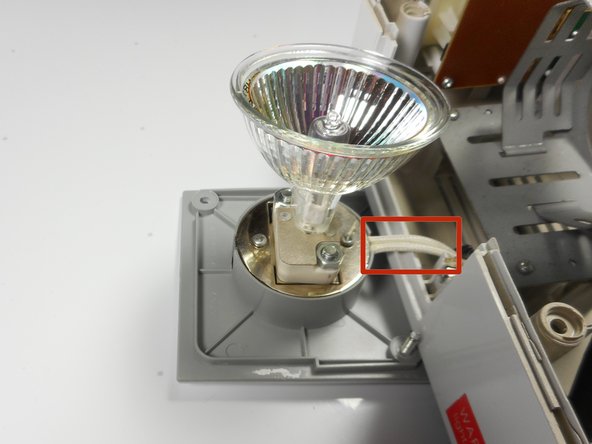
    • Do not damage the 2 white cables leading into the light bulb panel.

    댓글 쓰기

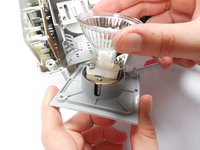
  5. Merch Source Projector Entertainment II Light Bulb Replacement, Replace light bulb: 5 단계, 이미지 2개 중 1개 Merch Source Projector Entertainment II Light Bulb Replacement, Replace light bulb: 5 단계, 이미지 2개 중 2개
    • Remove the light bulb from the door panel by gently wiggling it back and forth. Do not twist the light bulb.

    • The light blub is held into the socket with prongs, and should easily pull straight out.

    댓글 쓰기

결론

To reassemble your device, follow these instructions in reverse order.

취소: 해당 안내서를 완성하지 않았습니다.

다른 한 분이 해당 안내서를 완성하였습니다.

작성자

8다른 기여자 명과 함께

Stephanie

회원 가입일: 01/08/15

282 평판

안내서 3개를 작성함

Cal Poly, Team 18-3, Maness Winter 2015 Cal Poly, Team 18-3, Maness Winter 2015 회원

CPSU-MANESS-W15S18G3

3 회원들

안내서 4개를 작성함

1가이드 댓글

Mi nuevo proyector no prende la luz ni el ventilador al conectarlo al tomacorriente y encenderlo.

JAVIER MUNOZ - 답글 공유

댓글 쓰기

조회 통계:

지난 24시간: 4

지난 7일: 8

지난 30일: 47

전체 시간: 2,600