이 번역은 기계에 의해 생성된 것이며, 아직 사람이 검토하지 않았습니다. 이 언어를 아세요? 리뷰 보기.
소개
Surface Pro 4에는 M.2 Samsung SSD가 장착되어 있습니다. SSD가 고장 났거나 업그레이드를 원할 경우 이 안내서를 통해 교체할 수 있습니다.
필요한 것
-
-
-
-
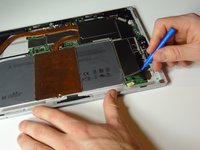
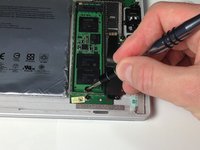
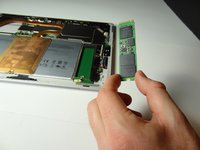
파란색 플라스틱 여는 도구 또는 스퍼저를 사용하여 SSD 드라이브를 살짝 들어 올린 다음 손가락으로 잡으세요. 드라이브를 사용자 쪽으로 당겨 기기에서 분리하세요.
-


 FixBot에 문의하기




기기를 재조립하려면 이 지침을 역순으로 따르세요.
다른 93명이 해당 안내서를 완성하였습니다.

팀

Metro State, Team 1-3, Carpenter Spring 2016 Metro State, Team 1-3, Carpenter Spring 2016 회원
MSU-CARPENTER-S16S1G3
2 회원들
안내서 72개를 작성함
46가이드 댓글
Can you add more SSD to the SP4??
dudu93lokao - 답글 공유
I would love to upgrade my storage while repairing my broken screen, does anyone know of which sdd would be compatible with my i7 8gb ram 256ssd right now? Does it have to be a samsung ssd or are there other options. Fairly new to computer repair here so would love some experienced advice thanks !
I would prefer a 1TB if possible but would settle for a 512 also.
@bthorne As long as it's the same connection (not sure, but maybe you should look for NVMe M.2 SSD) it should work without problems. You should run a quick search on the internet to check if anyone has found some sort of "blacklisted" parts (some vendors such as Lenovo used to place some code in their firmware which would prevent the computer from booting with a "unauthorized" wireless card for example.).
However I think this is not the case with the Surface Pro 4 or the world would be at rage right now. Just look for any size NVMe M.2 SSD you think it would be fit (if you can afford, look for performance models such as Samsung PRO, there's a huge difference from the cheaper ones.). Hope it helps!
