소개
This guide will go through the steps of replacing the camera module for the Motorola MB525 starting from the tear down of the phone to replacement of the camera module itself.
필요한 것
-
-
-
Using the screwdriver and the T-5 bit, unscrew the seven 5 mm screws around the outside of the phone.
 FixBot에 문의하기
-
-
-
Remove the back cover of the phone by sliding the bottom black button to the unlock position and lifting it up.
-
-
-
-
-
-
-
Unscrew the two silver screws located at the top of the back of the phone.
-
-
-
Use a plastic opening tool to gently pry the midframe from the rest of the phone.
-
-
-
-
-
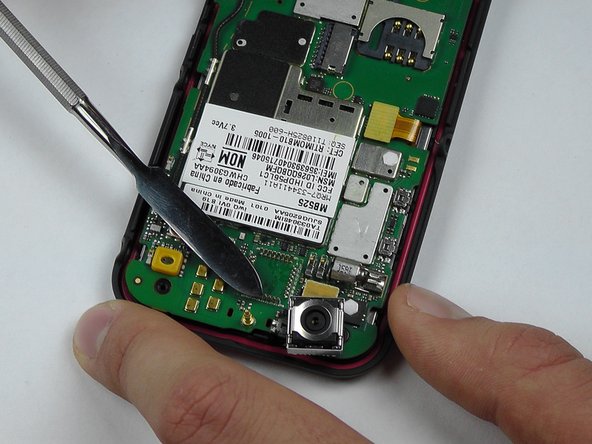
Start to pry around the bottom of the camera module with the metal spudger and replace with the new camera module.
-
-


To reassemble your device, follow these instructions in reverse order.

팀

USF Tampa, Team 14-2, Leahy Fall 2014 USF Tampa, Team 14-2, Leahy Fall 2014 회원
USFT-LEAHY-F14S14G2
4 회원들
안내서 18개를 작성함
