주요 콘텐츠로 건너뛰기
수리 커뮤니티 가입 - 계정 만들기

Motorola Droid Motherboard Replacement

필요한 것

  1. Motorola Droid Motherboard Replacement, Battery: 1 단계, 이미지 3개 중 1개 Motorola Droid Motherboard Replacement, Battery: 1 단계, 이미지 3개 중 2개 Motorola Droid Motherboard Replacement, Battery: 1 단계, 이미지 3개 중 3개
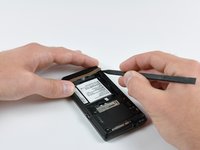
    • Slide the battery cover downwards while applying pressure to the center of the battery cover with your thumb.

    • Lift and remove the battery cover out from the phone.

    댓글 쓰기

  2. Motorola Droid Motherboard Replacement: 2 단계, 이미지 1개 중 1개
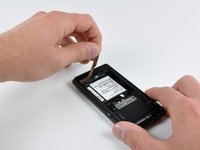
    • Grasp the upper left corner of the battery and lift it out of its housing.

    댓글 쓰기

  3. Motorola Droid Motherboard Replacement, Rear Case: 3 단계, 이미지 1개 중 1개
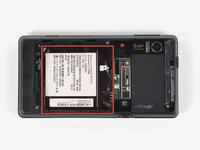
    • Use a spudger to lift and remove the black plastic screw cover at the top of the phone near the camera.

    • The cover is attached by adhesive, so some force may be required.

    댓글 쓰기

  4. Motorola Droid Motherboard Replacement: 4 단계, 이미지 2개 중 1개 Motorola Droid Motherboard Replacement: 4 단계, 이미지 2개 중 2개
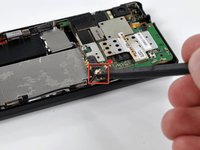
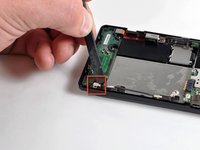
    • Using the tip of a spudger, peel up one corner of the gold ribbon beneath the battery compartment.

    • Peel the ribbon up off the phone.

    댓글 쓰기

  5. Motorola Droid Motherboard Replacement: 5 단계, 이미지 2개 중 1개 Motorola Droid Motherboard Replacement: 5 단계, 이미지 2개 중 2개
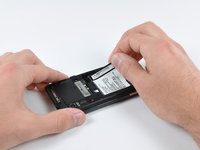
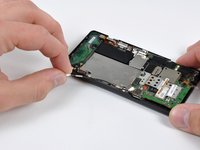
    • Carefully peel the device information label that covers the motherboard EMI shields.

    • This label contains important information specific to the phone. Remove it with care and keep it in a safe place.

    댓글 쓰기

  6. Motorola Droid Motherboard Replacement: 6 단계, 이미지 1개 중 1개
    • Insert the flat end of a spudger and pry the plastic camera cover up off the phone.

    • The thin plastic cover is attached to the phone with an adhesive. Work slowly and carefully.

    댓글 쓰기

  7. Motorola Droid Motherboard Replacement: 7 단계, 이미지 1개 중 1개
    • Remove the seven 5.5 mm T5 Torx screws securing the rear case to the inner case.

    댓글 쓰기

  8. Motorola Droid Motherboard Replacement: 8 단계, 이미지 1개 중 1개
    • Insert the flat end of a spudger and pry downwards to release the plastic tab holding the rear case to the motherboard screw.

    댓글 쓰기

  9. Motorola Droid Motherboard Replacement: 9 단계, 이미지 1개 중 1개
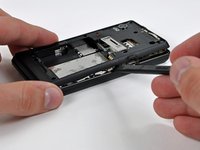
    • Gently insert a spudger between the rear case and front case at the top of the phone, near the audio jack.

    • Carefully pry the top edge of the rear case up from the rest of the phone.

    댓글 쓰기

  10. Motorola Droid Motherboard Replacement: 10 단계, 이미지 2개 중 1개 Motorola Droid Motherboard Replacement: 10 단계, 이미지 2개 중 2개
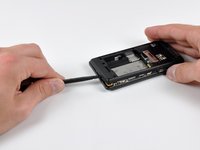
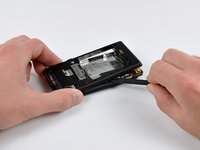
    • With the spudger still inserted between the rear case and front case, slide the spudger along the right edge of the device, moving toward the bottom, prying as you go.

    • Continue prying along the bottom edge of the device from right to left, freeing it from the front panel.

    댓글 쓰기

  11. Motorola Droid Motherboard Replacement: 11 단계, 이미지 2개 중 1개 Motorola Droid Motherboard Replacement: 11 단계, 이미지 2개 중 2개
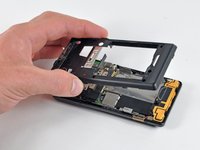
    • Continue prying the rear case from the front case along the left side, moving from bottom to top.

    • Lift the rear case up out of the phone.

    댓글 쓰기

  12. Motorola Droid Motherboard Replacement, Speaker: 12 단계, 이미지 1개 중 1개
    • Carefully lift and remove the speaker assembly up out of the phone.

    댓글 쓰기

  13. Motorola Droid Motherboard Replacement, Motherboard: 13 단계, 이미지 3개 중 1개 Motorola Droid Motherboard Replacement, Motherboard: 13 단계, 이미지 3개 중 2개 Motorola Droid Motherboard Replacement, Motherboard: 13 단계, 이미지 3개 중 3개
    • Use a spudger to pry the antenna cable connectors from their respective sockets on the motherboard and the speaker/antenna board.

    • De-route the antenna cable by pulling it out of the metal clips along the side of the front case.

    댓글 쓰기

  14. Motorola Droid Motherboard Replacement: 14 단계, 이미지 1개 중 1개
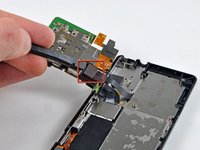
    • Peel the black tape covering the side button and display ribbon connectors on the motherboard.

    댓글 쓰기

  15. Motorola Droid Motherboard Replacement: 15 단계, 이미지 1개 중 1개
    • Disconnect the power button/volume button connector from its socket on the motherboard using the flat end of a spudger.

    댓글 쓰기

  16. Motorola Droid Motherboard Replacement: 16 단계, 이미지 1개 중 1개
    • Disconnect the display ribbon connector from its socket on the motherboard using the flat end of a spudger.

    댓글 쓰기

  17. Motorola Droid Motherboard Replacement: 17 단계, 이미지 1개 중 1개
    • Remove three 3.8 mm T5 Torx screws securing the motherboard to the front case.

    • Don't attempt to remove the motherboard yet, it is still attached by the keypad ribbon connector.

    댓글 쓰기

  18. Motorola Droid Motherboard Replacement: 18 단계, 이미지 2개 중 1개 Motorola Droid Motherboard Replacement: 18 단계, 이미지 2개 중 2개
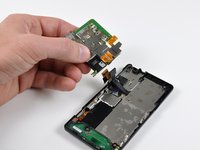
    • Carefully lift the motherboard from the front case and lay it next to the Droid, minding the keypad connector that is still attached.

    • Disconnect the keypad connector by prying it straight up off its socket on the motherboard.

    • Remove the motherboard from the phone.

    댓글 쓰기

결론

To reassemble your device, follow these instructions in reverse order.

취소: 해당 안내서를 완성하지 않았습니다.

다른 8명이 해당 안내서를 완성하였습니다.

작성자

7다른 기여자 명과 함께

Brett Hartt

회원 가입일: 04/12/10

132,200 평판

안내서 144개를 작성함

iFixit iFixit 회원

Staff

122 회원들

안내서 25,948개를 작성함

1가이드 댓글

Hi all,

Can anyone please suggest me should I dump my motorola droid. I have taken it to fix-it shops and they all have the same answer the mother board is gone

So, is it better to buy a new mother board which would cost me as much as a new phone or just sell it for nickels on Ebay

please reply pbansal1@jhu.edu

prateek - 답글 공유

댓글 쓰기

조회 통계:

지난 24시간: 4

지난 7일: 14

지난 30일: 72

전체 시간: 29,620