주요 콘텐츠로 건너뛰기
수리 커뮤니티 가입 - 계정 만들기

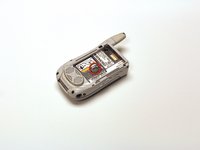
Motorola i450 Boost Mobile Keypad Replacement

필요한 것

  1. Motorola i450 Boost Mobile Keypad Replacement, Back Cover: 1 단계, 이미지 3개 중 1개 Motorola i450 Boost Mobile Keypad Replacement, Back Cover: 1 단계, 이미지 3개 중 2개 Motorola i450 Boost Mobile Keypad Replacement, Back Cover: 1 단계, 이미지 3개 중 3개
    • Place the phone on a flat surface with the front facing down.

    • Insert your finger under the gray plastic cover at the bottom end of the phone.

    • Lift the cover off the phone.

    댓글 쓰기

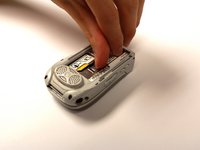
  2. Motorola i450 Boost Mobile Keypad Replacement, Battery: 2 단계, 이미지 3개 중 1개 Motorola i450 Boost Mobile Keypad Replacement, Battery: 2 단계, 이미지 3개 중 2개 Motorola i450 Boost Mobile Keypad Replacement, Battery: 2 단계, 이미지 3개 중 3개
    • Place your thumb in the notch in the lower left corner of the battery compartment.

    • Lift the battery up and away from the phone.

    • Remove the battery.

    댓글 쓰기

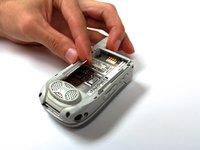
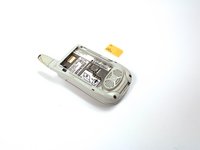
  3. Motorola i450 Boost Mobile Keypad Replacement, SIM Card: 3 단계, 이미지 2개 중 1개 Motorola i450 Boost Mobile Keypad Replacement, SIM Card: 3 단계, 이미지 2개 중 2개
    • Locate the metal slider that holds the SIM card in place.

    • Push the slider away from the metal flap which contains the SIM card. The flap will pop up.

    댓글 쓰기

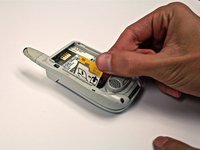
  4. Motorola i450 Boost Mobile Keypad Replacement: 4 단계, 이미지 3개 중 1개 Motorola i450 Boost Mobile Keypad Replacement: 4 단계, 이미지 3개 중 2개 Motorola i450 Boost Mobile Keypad Replacement: 4 단계, 이미지 3개 중 3개
    • Lift the metal flap to gain access to the bottom of the SIM card.

    • Remove the SIM card by sliding it out parallel to the bottom of the flap.

    댓글 쓰기

  5. Motorola i450 Boost Mobile Keypad Replacement, Circuit Board: 5 단계, 이미지 1개 중 1개
    • Extend the antenna.

    댓글 쓰기

  6. Motorola i450 Boost Mobile Keypad Replacement: 6 단계, 이미지 1개 중 1개
    • Remove the four 4.8 mm Torx T6 screws from the corners of the back of the phone.

    • If the antenna is not fully extended, the top left screw will not be accessible.

    댓글 쓰기

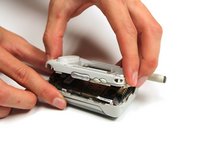
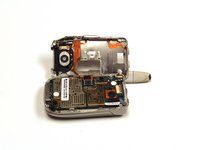
  7. Motorola i450 Boost Mobile Keypad Replacement: 7 단계, 이미지 3개 중 1개 Motorola i450 Boost Mobile Keypad Replacement: 7 단계, 이미지 3개 중 2개 Motorola i450 Boost Mobile Keypad Replacement: 7 단계, 이미지 3개 중 3개
    • Gently lift off the back half of the phone and set to the side.

    • Permanent circuit connections prevent the cover from completely separating from the phone. Do not attempt to disconnect these circuits.

    댓글 쓰기

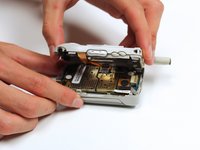
  8. Motorola i450 Boost Mobile Keypad Replacement, Keypad: 8 단계, 이미지 3개 중 1개 Motorola i450 Boost Mobile Keypad Replacement, Keypad: 8 단계, 이미지 3개 중 2개 Motorola i450 Boost Mobile Keypad Replacement, Keypad: 8 단계, 이미지 3개 중 3개
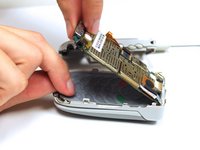
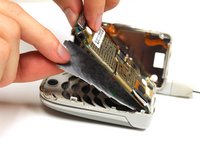
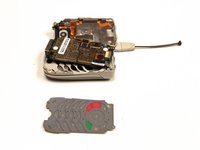
    • Gently lift the end of the circuit board farthest from the phone hinge.

    • The circuit board is permanently connected to the phone casing at the end nearest to the hinge.

    • Grasp the keypad at the bottom of the phone, raise it, and pull it away.

    댓글 쓰기

결론

To reassemble your device, follow these instructions in reverse order.

취소: 해당 안내서를 완성하지 않았습니다.

작성자

5다른 기여자 명과 함께

Garrison Stevens

회원 가입일: 10/22/12

1 평판

안내서 6개를 작성함

Clemson, Team 15-2, Benson Fall 2012 Clemson, Team 15-2, Benson Fall 2012 회원

CLEM-BENSON-F12S15G2

4 회원들

안내서 25개를 작성함

0가이드 댓글

댓글 쓰기

조회 통계:

지난 24시간: 0

지난 7일: 2

지난 30일: 23

전체 시간: 739