주요 콘텐츠로 건너뛰기
수리 커뮤니티 가입 - 계정 만들기

Munchkinz Battery Replacement

필요한 것

  1. Munchkinz Battery Replacement, Opening Device: 1 단계, 이미지 1개 중 1개
    • Insert spudger into the USB Micro slot and pry the case apart.

    • Be careful not to go too deep and bend the prong inside the Micro USB port.

  2. Munchkinz Battery Replacement, Pry Device Apart: 2 단계, 이미지 2개 중 1개 Munchkinz Battery Replacement, Pry Device Apart: 2 단계, 이미지 2개 중 2개
    • Slide the wide plastic opening tool across the seem, separating it if you can't pry the device open using just the spudger.

    • Gently separate the case so none of the cords inside are disconnected

  3. Munchkinz Battery Replacement, Separated Device: 3 단계, 이미지 1개 중 1개
    • After prying the device apart, it should look like this.

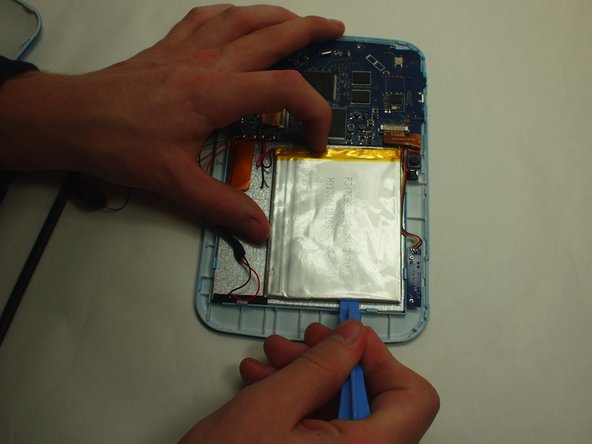
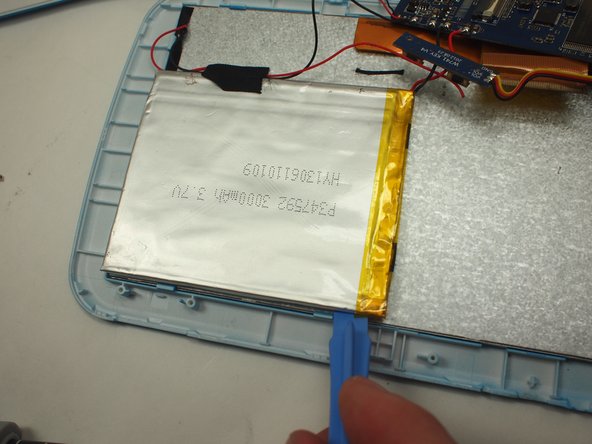
  4. Munchkinz Battery Replacement, Removing battery: 4 단계, 이미지 3개 중 1개 Munchkinz Battery Replacement, Removing battery: 4 단계, 이미지 3개 중 2개 Munchkinz Battery Replacement, Removing battery: 4 단계, 이미지 3개 중 3개
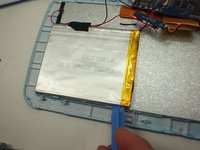
    • Use the wide plastic opening tool to slowly pry each side of the battery up.

    • Be careful not to bend the battery too much.

  5. Munchkinz Battery Replacement, Remove battery completely: 5 단계, 이미지 1개 중 1개
    • Use the Soldering Iron to disconnect the each cable.

결론

To reassemble your device, follow these instructions in reverse order.

작성자

3다른 기여자 명과 함께

Hee Jin Cho

회원 가입일: 01/14/15

113 평판

안내서 1개를 작성함

UW Tacoma, Team 3-6, Rose Winter 2015 UW Tacoma, Team 3-6, Rose Winter 2015 회원

UWT-ROSE-W15S3G6

3 회원들

안내서 14개를 작성함

0가이드 댓글

댓글 쓰기

조회 통계:

지난 24시간: 0

지난 7일: 4

지난 30일: 12

전체 시간: 598