주요 콘텐츠로 건너뛰기

NP-R540-JA09US Keyboard Replacement

필요한 것

  1. NP-R540-JA09US Keyboard Replacement, Battery: 1 단계, 이미지 1개 중 1개
    • Turn off laptop before starting.

    • Remove power cable before starting.

    • Flip the laptop over so that the bottom of the laptop is facing upwards.

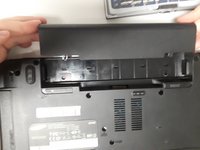
  2. NP-R540-JA09US Keyboard Replacement: 2 단계, 이미지 1개 중 1개
    • Pull the two latches outward.

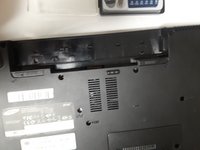
  3. NP-R540-JA09US Keyboard Replacement: 3 단계, 이미지 2개 중 1개 NP-R540-JA09US Keyboard Replacement: 3 단계, 이미지 2개 중 2개
    • Slide the battery out of the laptop.

  4. NP-R540-JA09US Keyboard Replacement, Optical Drive: 4 단계, 이미지 1개 중 1개
    • Remove securing screw with the PH0 head.

  5. NP-R540-JA09US Keyboard Replacement: 5 단계, 이미지 1개 중 1개
    • Slide the optical drive out and remove it from the device.

  6. NP-R540-JA09US Keyboard Replacement, Keyboard: 6 단계, 이미지 1개 중 1개
    • Remove the two Phillips #0 screws labeled KBD.

    • There are 5 clips along the top of the keyboard. Insert a thin opener tool (iSessamo tool or similar) between each clip and the keyboard tray to release it.

    • Make sure to pry the metal keyboard base and not the keycaps.

  7. NP-R540-JA09US Keyboard Replacement: 8 단계, 이미지 1개 중 1개
    • Do not bend your keyboard as shown in this picture.

    • Lift the keyboard up to release catches on the sides, then slide the keyboard towards the screen to slide tabs out of the slots at the bottom.

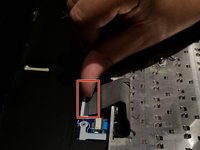
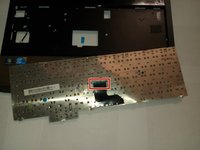
  8. NP-R540-JA09US Keyboard Replacement: 9 단계, 이미지 2개 중 1개 NP-R540-JA09US Keyboard Replacement: 9 단계, 이미지 2개 중 2개
    • Disconnect the keyboard cable from the motherboard.

결론

To reassemble your device, follow these instructions in reverse order.

다른 2명이 해당 안내서를 완성하였습니다.

작성자

4다른 기여자 명과 함께

Derek Wheeler

회원 가입일: 09/21/18

251 평판

안내서 1개를 작성함

0가이드 댓글

댓글 쓰기

조회 통계:

지난 24시간: 0

지난 7일: 3

지난 30일: 13

전체 시간: 1,055