필요한 것
-
-
-
Remove the red rubber case from the device. This should come off with ease.
 FixBot에 문의하기
-
-
-
Turn the device so the screen is facing away from you.
-
Using a philips head, size #00, screwdriver, remove the screws in each corner of the plastic casing.(total of 4 screws)
-
-
-
-
After loosening the back cover, remove it from the device so you can get at the innards.
-
-
-
-
-
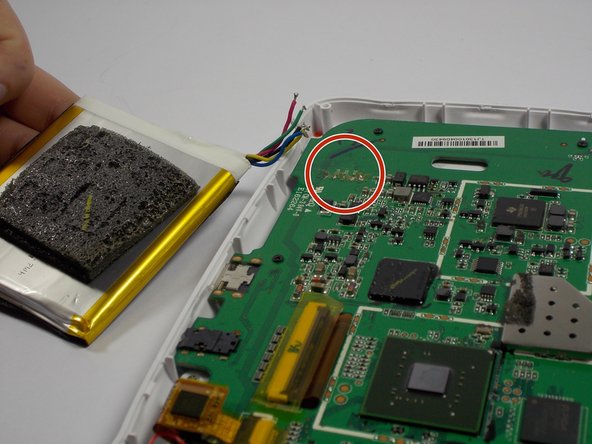
Replace the old battery with the new one
-
Solder the wires of the new battery into the pads on the motherboard
-
-
-
Once the wires are fully soldered, put the new battery back to the initial position
-
Close the case by putting the back cover back on the device
-
-
-
Once the back cover is on, screw in the four screws that you had taken off in the beginning
-
Put the red rubber casing back on.
-




If all the steps were followed correctly, the device should be fully closed and ready to go
다른 4명이 해당 안내서를 완성하였습니다.

팀

UMass Dartmouth, Team 4-3, Vijaybhaskar Spring 2015 UMass Dartmouth, Team 4-3, Vijaybhaskar Spring 2015 회원
UMASSD-VIJAYBHASKAR-S15S4G3
3 회원들
안내서 12개를 작성함
7가이드 댓글
Thank you for sharing the idea ,but I need that NABI JR battery. So ,where from I can purchase it .
I have seen them on ebay but it's easier to find a Nabi 2 battery on ebay. The Nabi 2 battery is quite a bit larger but with a very minor mod to the Nabi Jr. the Nabi 2 battery will fit and give you a much longer run time from a single charge.
darcshadow - 답글 공유
My old Nabi jr battery is a plug in with 2 reds 1 white and 2 black wires. My new Cameron sino battery is blue green red yellow black. What is the order to resolder them.
Dennis Blixt - 답글 공유
I have the same problem with the problem of the replacement battery not having the same wiring configuration or plug. Did you ever get this resolved?
Delores Duke - 답글 공유
